EducationSoftwareStrategy.com
StrategyCommunity

Knowledge Base

Product

Community

Knowledge Base

TopicsBrowse ArticlesDeveloper Zone

Product

Download SoftwareProduct DocumentationSecurity Hub

Education

Tutorial VideosSolution GalleryEducation courses

Community

GuidelinesGrandmastersEvents
x_social-icon_white.svglinkedin_social-icon_white.svg
Strategy logoCommunity

© Strategy Inc. All Rights Reserved.

LegalTerms of UsePrivacy Policy
  1. Home
  2. Topics

KB40272: When creating a subscription using MicroStrategy Developer and Distribution Services, double-clicking on a user does not move it to the left side in the "Choose Recipients" window.


Stefan Zepeda

Salesforce Solutions Architect • Strategy


This article explains that in the MicroStrategy Developer subscription creation interface, users can only be selected using the available arrow buttons and not with the action of double mouse click

SYMPTOM
When creating a subscription  using Strategy Developer 9.4.x - 10.x, double-clicking on a user does not move the user to the "Selected members" box of the "Choose Recipients" window.
 
STEPS TO REPRODUCE
Within Strategy Tutorial

  • Log in to Strategy Developer and go to Administration - Configuration Managers - Subscriptions.
  • Right-click and go to "Subscription Creation Wizard."
  • Once there, go through steps 1 and 2.
  • Once in the "Choose Recipients" window, click the "To..." button.

ka044000000kFxqAAE_0EM4400000029la.png
  • Double-click on a user group to bring up the list of users.
  • Double-click on a user and notice it will NOT move to the "Selected Members" box.

ka044000000kFxqAAE_0EM4400000029lm.png
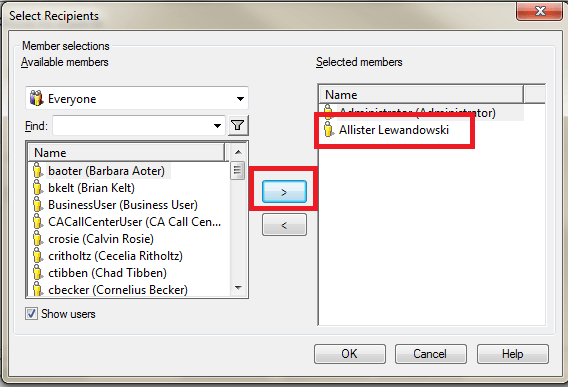
  • Use the arrow pointing to the right and the user will move to the "Selected Members" box.

ka044000000kFxqAAE_0EM4400000029lc.png

CAUSE
This is working as designed in Strategy Developer 9.4.x - 10.x. User objects can only be selected by using the arrow button.


Comment

0 comments

Details

Knowledge Article

Published:

May 3, 2017

Last Updated:

May 3, 2017