EducationSoftwareStrategy.com
StrategyCommunity

Knowledge Base

Product

Community

Knowledge Base

TopicsBrowse ArticlesDeveloper Zone

Product

Download SoftwareProduct DocumentationSecurity Hub

Education

Tutorial VideosSolution GalleryEducation courses

Community

GuidelinesGrandmastersEvents
x_social-icon_white.svglinkedin_social-icon_white.svg
Strategy logoCommunity

© Strategy Inc. All Rights Reserved.

LegalTerms of UsePrivacy Policy
  1. Home
  2. Topics

KB40289: New Feature in 9.3.0 MicroStrategy Web: Filter Panel


Community Admin

• Strategy


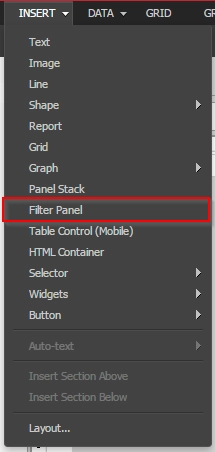
Filter Panel is a new, dedicated panel stack type (see first image), used only for selectors. This article describes how this can be used.

Filter Panel is a new, dedicated panel stack type (see first image), used only for selectors. This feature is only available in Editable and Presentation Mode. This panel stack has several features such as:

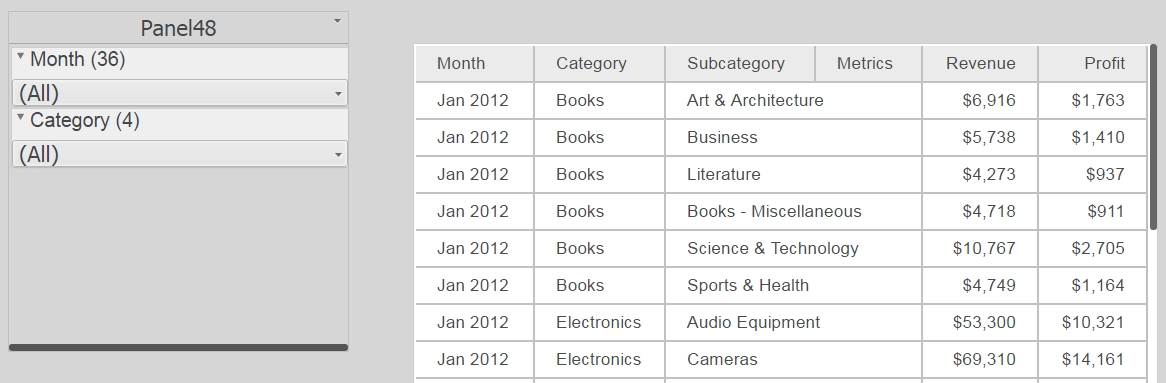
  • Expand/collapse a selector, (see image below)
  • Display element count (number selected as well as total available) (see image below)
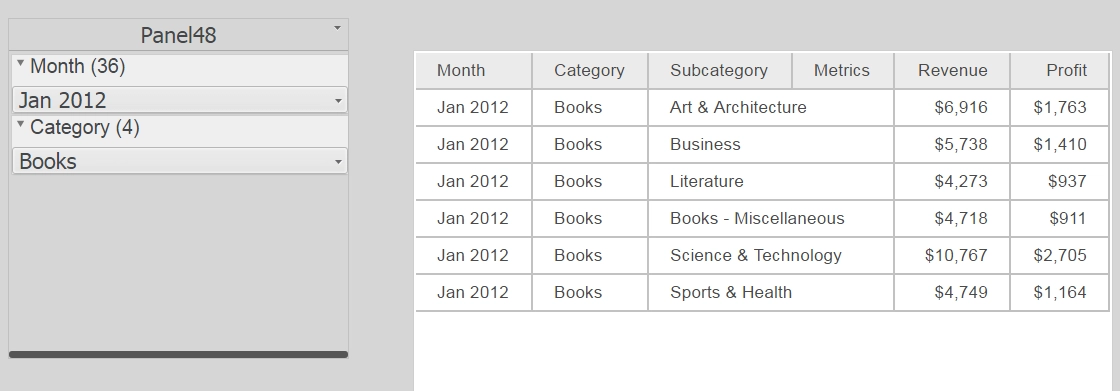
  • Clear filter selections (see image below)

Menu option for Filter Panel:

ka04W000000Oe21QAC_0EM440000002Hu2.png

 
Filter Panel with two selectors

ka04W000000Oe21QAC_0EM440000002Hu7.png

 
Filter Panel displays element counts

ka04W000000Oe21QAC_0EM440000002HuC.png

Filter Panel also provides options below (only in Presentation Mode):

  • Expand or collapse selectors
  • Clear all filters
  • Auto-applying changes: If this setting is disabled, it allows the user to select items in the selector, then choose when to apply the selections to the target. If enabled, the changes will be applied automatically.


ka04W000000Oe21QAC_0EM440000002HuH.png

Comment

0 comments

Details

Knowledge Article

Published:

April 4, 2017

Last Updated:

April 4, 2017