EducationSoftwareStrategy.com
StrategyCommunity

Knowledge Base

Product

Community

Knowledge Base

TopicsBrowse ArticlesDeveloper Zone

Product

Download SoftwareProduct DocumentationSecurity Hub

Education

Tutorial VideosSolution GalleryEducation courses

Community

GuidelinesGrandmastersEvents
x_social-icon_white.svglinkedin_social-icon_white.svg
Strategy logoCommunity

© Strategy Inc. All Rights Reserved.

LegalTerms of UsePrivacy Policy
  1. Home
  2. Topics

KB40303: How to disable Quick Search in MicroStrategy Web


Community Admin

• Strategy


How to disable Quick Search in MicroStrategy Web.

The are two ways to disable Quick Search in Strategy Web and they are illustrated below:
 
1. Quick search can be disabled by un-checking "Allow quick search" under Web Preferences -> Project Defaults -> General -> Search (see image below).
     NOTE: The real time search (as user types in the search box) will not be available after quick search is disabled.

 

ka04W00000148f3QAA_0EM44000000270a.jpeg

 
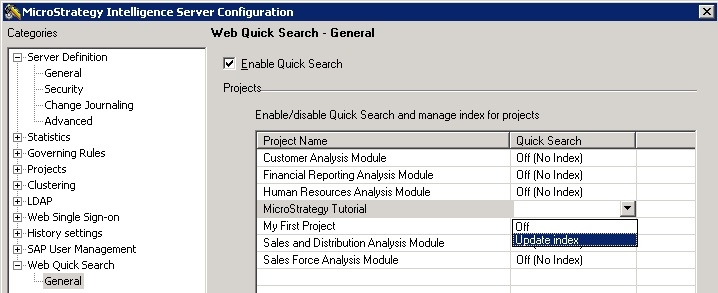
2. Quick search can also be disabled from Desktop by turning off the Quick Search (see image below) under Strategy Intelligence Server Configuration.
 

ka04W00000148f3QAA_0EM44000000270Y.jpeg


Comment

0 comments

Details

Knowledge Article

Published:

April 3, 2017

Last Updated:

April 3, 2017