EducationSoftwareStrategy.com
StrategyCommunity

Knowledge Base

Product

Community

Knowledge Base

TopicsBrowse ArticlesDeveloper Zone

Product

Download SoftwareProduct DocumentationSecurity Hub

Education

Tutorial VideosSolution GalleryEducation courses

Community

GuidelinesGrandmastersEvents
x_social-icon_white.svglinkedin_social-icon_white.svg
Strategy logoCommunity

© Strategy Inc. All Rights Reserved.

LegalTerms of UsePrivacy Policy
  1. Home
  2. Topics

KB40310: "Request Timeout" error appears when using the Junction URL for a Trusted Authentication provider as the Mobile Server Name parameter in the MicroStrategy Mobile 9.x Configuration.


Community Admin

• Strategy


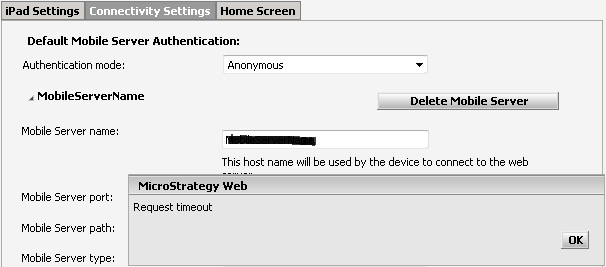
A "Request Timeout" error is received upon setting up a mobile configuration using Trusted Authentication with Tivoli SSO when the junction URL is being used as the Server Name parameter in the MicroStrategy Mobile 9.x Administrator page.

SYMPTOM:
 
A "Request Timeout" error is received upon setting up a mobile configuration using Trusted Authentication with Tivoli SSO when the junction URL is being used as the Server Name parameter in the Strategy Mobile 9.x Administrator page.
 

ka04W000000OgnaQAC_0EM44000000277V.jpeg

 
CAUSE:
 
During the setup of the Strategy Mobile 9.x configuration the Mobile Server Name parameter needs to resolve to an actual Strategy Mobile server in order to verify that a Strategy Intelligence Server is actually connected in order to retrieve its list of projects. When the junction URL is used instead, the check for the Intelligence Servers connectivity times out causing the error. 
 
ACTION:
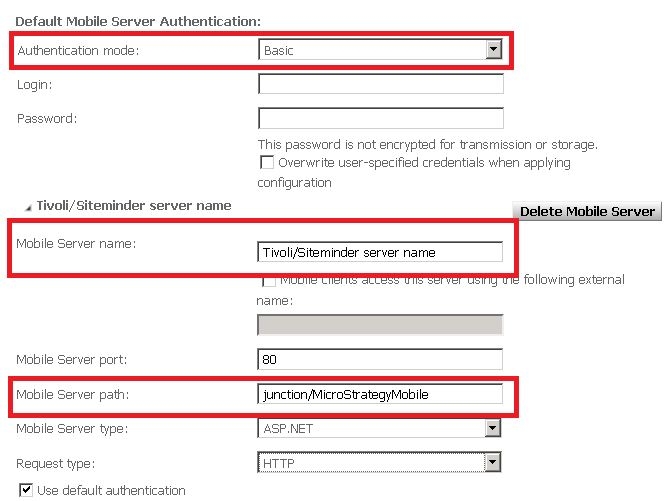
Basic authentication should be used. In mobile server, enter the Tivoli/Siteminder server name. In the mobile server path, input the junction name plus /StrategyMobile as below:
ka04W000000OgnaQAC_0EM44000000277H.jpeg


Comment

0 comments

Details

Knowledge Article

Published:

June 9, 2017

Last Updated:

June 9, 2017