EducationSoftwareStrategy.com
StrategyCommunity

Knowledge Base

Product

Community

Knowledge Base

TopicsBrowse ArticlesDeveloper Zone

Product

Download SoftwareProduct DocumentationSecurity Hub

Education

Tutorial VideosSolution GalleryEducation courses

Community

GuidelinesGrandmastersEvents
x_social-icon_white.svglinkedin_social-icon_white.svg
Strategy logoCommunity

© Strategy Inc. All Rights Reserved.

LegalTerms of UsePrivacy Policy
  1. Home
  2. Topics

KB40312: Conditional Formatting based off of the value of a prompted attribute and applied to a shape fails to take effect in MicroStrategy Web 9.x and 10.x


Stefan Zepeda

Salesforce Solutions Architect • Strategy


KB40312: Conditional Formatting based off of the value of a prompted attribute and applied to a shape fails to take effect in MicroStrategy Web 9.x and 10.x

SYMPTOM:
 
Users setup conditional formatting on a shape shape to format its properties based on the value of an attribute that is prompted during execution. The setup of this type of conditional formatting has to be done through Strategy Developer 9.x and 10.x, however upon testing it through Strategy Web 9.x and 10.x the conditional formatting doesn't seem to take effect.
 
STEPS TO REPRODUCE:
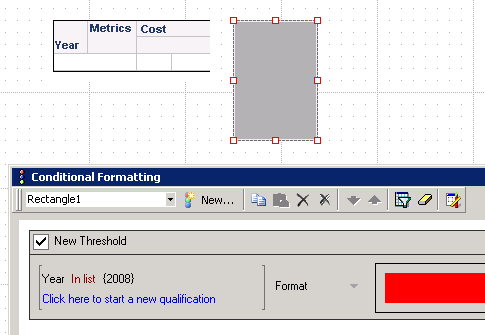
  • Create a report in Strategy Desktop 9.x with Year and Cost in the Grid. Insert a Prompt for Year.
  • Insert a shape and apply conditional formatting on this shape based on Year In List 2008 as shown below.
ka02R000000kXHiQAM_0EM440000002DDc.png
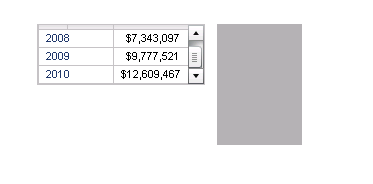
  • Note: Originally the square is gray but if the condition were to be met, it should be filled with red color.
  • Run the Document in Strategy Web with the year 2008 included in the filter and note the conditional formatting did not apply.
ka02R000000kXHiQAM_0EM440000002DDa.png

 
CAUSE:
 
This is a known issue with Strategy Web 9.2.1m and it can happen under two different scenarios: The one described above with a prompt on the attribute or with a selector on the attribute.
 
ACTION:
 
Contact Strategy Technical Support for an update on the status of this issue.
 
WORKAROUND:
If possible instead of using a prompt or a selector, use the Grouping Section of the Document to manipulate selections of the attribute elements. This will make the conditional formatting start taking effect.


Comment

0 comments

Details

Knowledge Article

Published:

June 19, 2017

Last Updated:

June 19, 2017