EducationSoftwareStrategy.com
StrategyCommunity

Knowledge Base

Product

Community

Knowledge Base

TopicsBrowse ArticlesDeveloper Zone

Product

Download SoftwareProduct DocumentationSecurity Hub

Education

Tutorial VideosSolution GalleryEducation courses

Community

GuidelinesGrandmastersEvents
x_social-icon_white.svglinkedin_social-icon_white.svg
Strategy logoCommunity

© Strategy Inc. All Rights Reserved.

LegalTerms of UsePrivacy Policy
  1. Home
  2. Topics

KB40337: How can an Administrator trace the language settings for a Web User in MicroStrategy Web 9.4.x-10.x?


Stefan Zepeda

Salesforce Solutions Architect • Strategy


This article shows that when making changes at the user level to the Web Preferences for languages, including all advanced settings, no changes are highlighted in the Preferences Manager in Developer

SYMPTOM:
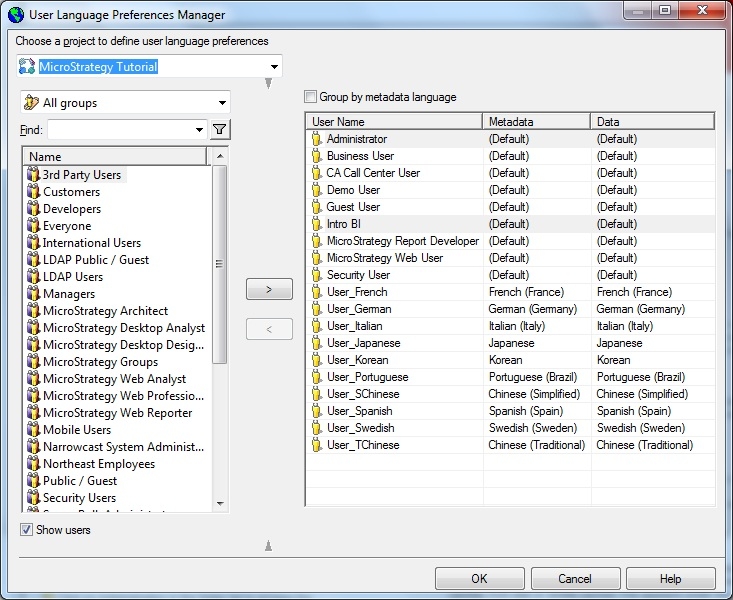
The Administrator can manage the language settings for users per project by using the "User Language Preferences Manager" which is found via the Project Configuration > Language > User Preferences:
ka02R000000kX25QAE_0EM440000002DDm.jpeg

 
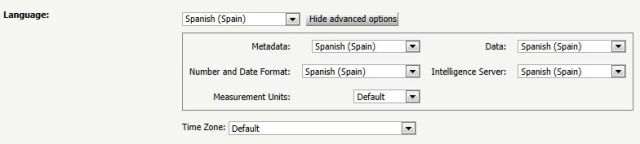
When a user changes the language settings in Web via the Web Preferences, no changes are recorded in the User Language Preferences Manager:
ka02R000000kX25QAE_0EM440000002DDl.jpeg

CAUSE:
This is a known issue in Strategy 9.x.
 
ACTION:
Strategy will continue to investigate and post updates as soon as they are available.


Comment

0 comments

Details

Knowledge Article

Published:

April 11, 2017

Last Updated:

April 11, 2017