SYMPTOM
In Strategy Intelligence Server, import of a cube from an MDX data source such as SAP/Essbase/Microsoft Analysis Services fails with the following error:
Network: Please retry task due to network request timeout. If problem persists, contact your network administrator.

This error is seen only in 3-tier connection. Also, this error is not seen immediately after initiating a cube import indicating that that some timeout is truly being hit.
Increasing the connection timeout on the 3-tier project source does not help.
Clicking on OK on the above error results in the following error:
Object variable or With block variable not set.

CAUSE
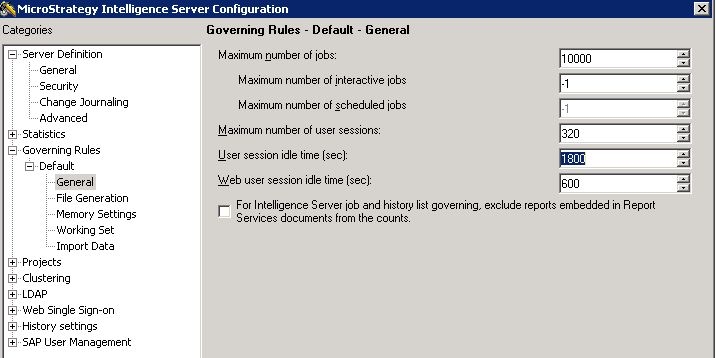
This error can be seen in cases where the user session idle time set on the Strategy Intelligence Server Configuration is not sufficient. The default value for this governing setting is 1800 seconds. For large MDX cubes, the import process can take longer than 30 minutes.
ACTION
Increase the user session idle time on the Strategy Intelligence Server configuration editor to a higher value that would allow the cube import to complete.