EducationSoftwareStrategy.com
StrategyCommunity

Knowledge Base

Product

Community

Knowledge Base

TopicsBrowse ArticlesDeveloper Zone

Product

Download SoftwareProduct DocumentationSecurity Hub

Education

Tutorial VideosSolution GalleryEducation courses

Community

GuidelinesGrandmastersEvents
x_social-icon_white.svglinkedin_social-icon_white.svg
Strategy logoCommunity

© Strategy Inc. All Rights Reserved.

LegalTerms of UsePrivacy Policy
  1. Home
  2. Topics

KB40347: "The attribute, 'displayName', is not existed in this LDAP server" error message appears when an LDAP attribute value is specified to import as user name in MicroStrategy 9.x


Community Admin

• Strategy


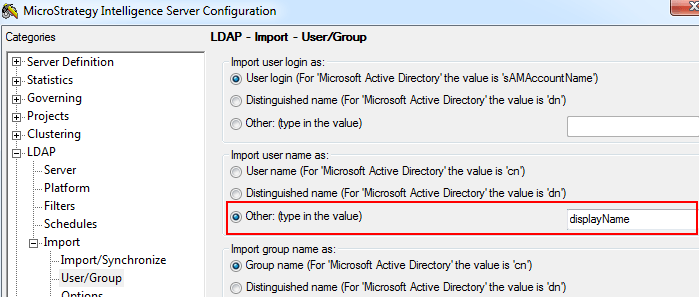
The error message, "The attribute, 'displayName', is not existed in this LDAP server", appears when an LDAP attribute value is specified to import as user name in MicroStrategy 9.x

SYMPTOM:
If an LDAP attribute value (for example 'displayName') is specified under 'Strategy Intelligence Server Configuration > LDAP > Import > User/Group > Import user name as' for Microsoft Active Directory, as shown below:
 

ka04W000000ObNkQAK_0EM4400000029ll.png

 
the following error is logged to DSSErrors.log:


2012-05-30 12:12:23.768-05:00 LDAP authentication trace: The attribute, 
'displayName', is not existed in this LDAP server
2012-05-30 12:12:23.784-05:00 LDAP authentication trace: We use LDAP 
attribute, 'cn', for Strategy user name

  
CAUSE:
This error can occur if:

  1. The specified attribute (for example 'displayName') does not exist on the Active Directory server for the user being imported by the Intelligence Server.
  2. The specified attribute does not exist on the Active Directory server for the "Authentication User" specified under Intelligence Server Configuration > LDAP > Server.

If the specified attribute cannot be found on the Active Directory server, the Intelligence Server automatically defaults to importing the attribute 'cn' as the user name.
 
ACTION:
Perform the following checks on the Active Directory server:

  1. Ensure that the specified attribute exists on the Active Directory server for the user being imported by the Intelligence Server.
  2. Ensure that the specified attribute exists on the Active Directory server for the "Authentication User" specified under Intelligence Server Configuration > LDAP > Server. 


Comment

0 comments

Details

Knowledge Article

Published:

June 2, 2017

Last Updated:

June 2, 2017