SYMPTOM:
When calculating the difference between two dates against Microsoft SQL Server, the report result presents incorrect values.
STEPS TO REPRODUCE:
1. Considering the following table with two Datetime columns.
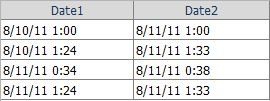
2. Create two facts based on these columns.
3. Create two attributes based on the newly created facts, saving them as Date 1 and Date 2.
4. Create one metric for each fact using the expression Max () and Max (). Save the metrics as DATE1 and DATE2, respectively.
5. Create a compound metric based on the newly created metrics using the expression ( - ) and save as Result:
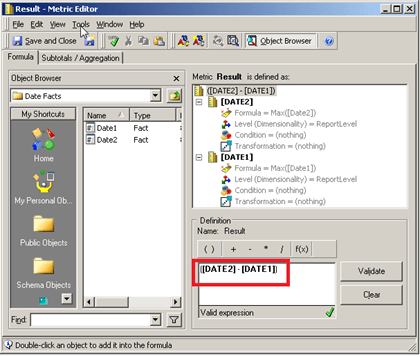
6. Create a report adding the attributes Date 1 and Date 2 to the rows and the metric Result to the columns, save and execute the report.
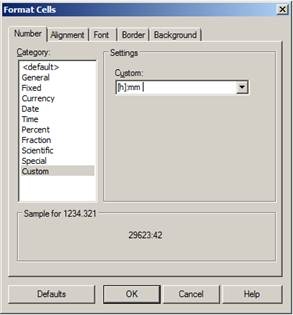
7. Format the Result values number as Custom using as mask :mm and click on OK:
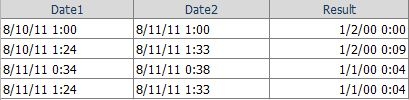
8. The report will returns incorrect values for the metric Result as seen:

9. The report should have returned the following values, instead:

CAUSE:
This is an expected behavior when performing date and date time calculations against Microsoft SQL Server without using the Datediff function that is a feature of the Microsoft SQL Server.
In order to prove that it is an expected behavior, launch the Strategy DB Query Tool and run the SQL Statement Select DATE1, DATE2, datediff (MINUTE, DATE1, DATE2) as Right_Result from Table xxxx. It will return the correct result where the Right_Result columns shows the date time difference without the mask :mm:

Now, run the SQL Statement Select DATE1, DATE2, DATE2 – DATE1 as Result from Table xxxx. The values on the Result column are incorrect.
WORKAROUND:
As workaround, convert both dates in minutes before calculating the date difference.
NOTE:
Please, refer to the following Microsoft Technical Note "http://msdn.microsoft.com/en-us/library/ms189794.aspx " for further information on Datediff
