EducationSoftwareStrategy.com
StrategyCommunity

Knowledge Base

Product

Community

Knowledge Base

TopicsBrowse ArticlesDeveloper Zone

Product

Download SoftwareProduct DocumentationSecurity Hub

Education

Tutorial VideosSolution GalleryEducation courses

Community

GuidelinesGrandmastersEvents
x_social-icon_white.svglinkedin_social-icon_white.svg
Strategy logoCommunity

© Strategy Inc. All Rights Reserved.

LegalTerms of UsePrivacy Policy
  1. Home
  2. Topics

KB40396: The Microstrategy License Manager tool in version 10.9 and 10.10 does not show MicroStrategy Collaboration in the list of products


Community Admin

• Strategy


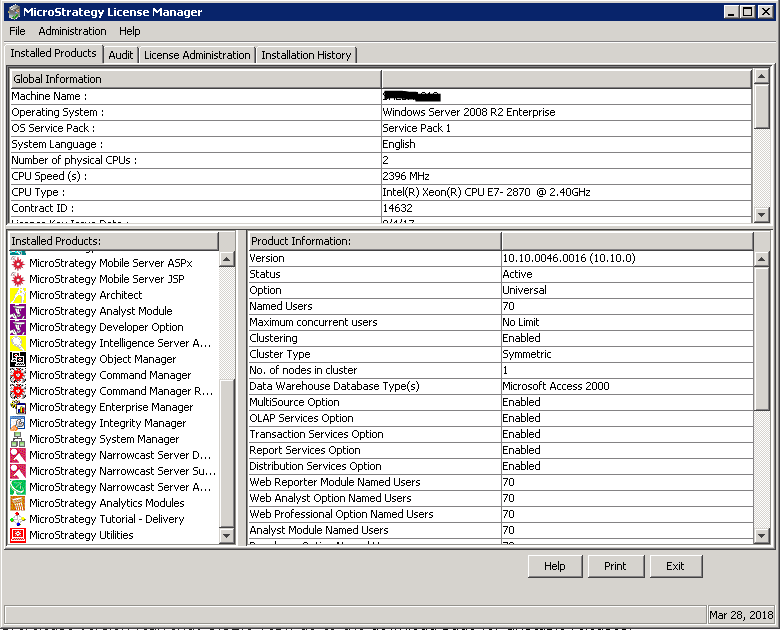
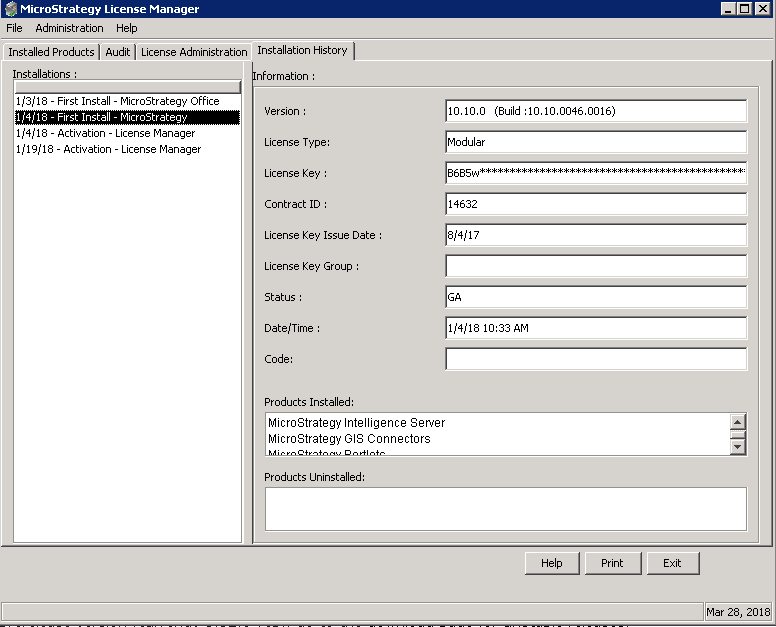
When using the License Manager tool in version 10.9 and 10.10 users cannot see the Collaboration Server listed in the tab Installed Product. The Collaboration Server is listed when clicking on the tab Installation History.

STEPS TO REPRODUCE
Run the License Manager, the Installed Products window of the Installed Product tab, does not show Strategy Collaboration in the list of products.
ka04W000000OaziQAC_0EM44000000A69w.png

Click on Installation History tab, in the Products Installed product window scroll down. You can see a product name Strategy Collaboration Server installed on the list of products installed.
ka04W000000OaziQAC_0EM44000000A6A1.png

RESOLUTION
The issue is a defect and it is fixed in Strategy 10.11.
Article Reference Number:  KB40396


Comment

0 comments

Details

Knowledge Article

Published:

March 28, 2018

Last Updated:

December 31, 2018