In a Report Services, it is possible to have the document available for some users to only view the information and enable other users to execute transactions to modify the information in the same document.
For example, it is possible to have a transaction enabled dashboard where user A can edit the information in the data warehouse and user B only view the data.
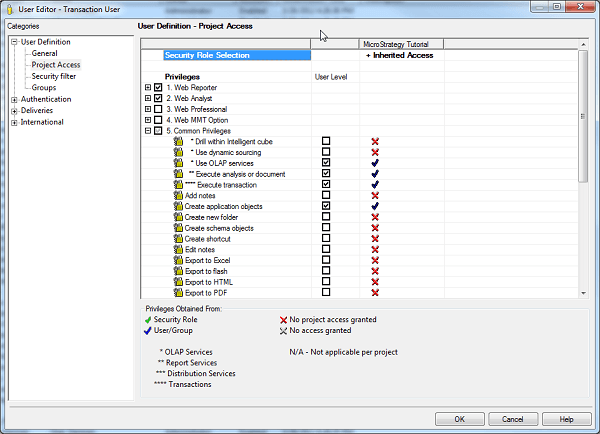
Users with the "Execute Transaction” Privilege (Found in Privilege section 5. Common Privileges of the User/Group Editor) are able to edit the grid data in a transaction dashboard and use the available button to submit the information.
Users without this privilege can only see the document but cannot make changes to it and the submit button for the transaction will be hidden.
The following example is using a simple transaction enabled dashboard in tutorial. In both cases the same dashboard and user is being used. The only difference is the privilege granted.
I. Example user with Execute transaction privilege
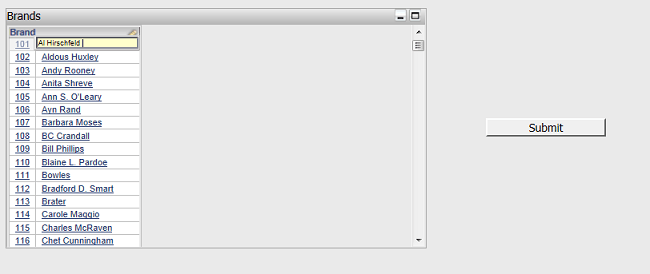
Here the transaction document shows the editable elements and the submit button.
II. Example user without Execute transaction privilege
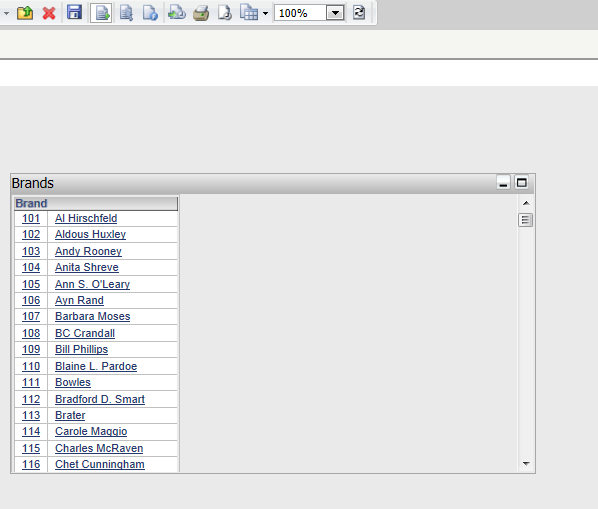
Here the transaction document grid is not an editable element and the submit button is hidden.
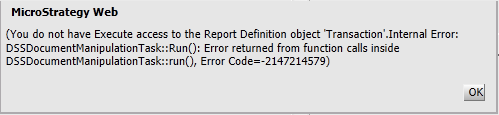
Note: The user also needs to have View access in the transaction report’s ACL. If a user who does not have permission over the transaction report try to execute the transaction, an error like the following will appear (even if the Execute transaction privilege has been granted to the user)
Sample Code/Error
(You do not have Execute access to the Report Definition object ‘Transaction’.Internal Error:
DSSDocumentManipulationTast::Run(): Error returned from function calls inside
DSSDocumentManipulationTast::Run(), Error code=-2147214579)
