EducationSoftwareStrategy.com
StrategyCommunity

Knowledge Base

Product

Community

Knowledge Base

TopicsBrowse ArticlesDeveloper Zone

Product

Download SoftwareProduct DocumentationSecurity Hub

Education

Tutorial VideosSolution GalleryEducation courses

Community

GuidelinesGrandmastersEvents
x_social-icon_white.svglinkedin_social-icon_white.svg
Strategy logoCommunity

© Strategy Inc. All Rights Reserved.

LegalTerms of UsePrivacy Policy
  1. Home
  2. Topics

KB404330: "The filter is empty" appears under Report Filter section of cover page generated by print option with MicroStrategy Web


Community Admin

• Strategy


"The filter is empty" appears under the Report Filter section of a cover page when a user selects the Print option for a report which has a filter added by answering prompts in MicroStrategy Web.

SYMPTOM:
"The filter is empty" appears under the Report Filter section of a cover page when a user selects the Print option for a report which has a filter added by answering prompts in Strategy Web 9.4.x-10.x
 
STEPS TO REPRODUCE:
Execute the following in Strategy Tutorial:
  • Create a filter defined with an attribute element prompt.
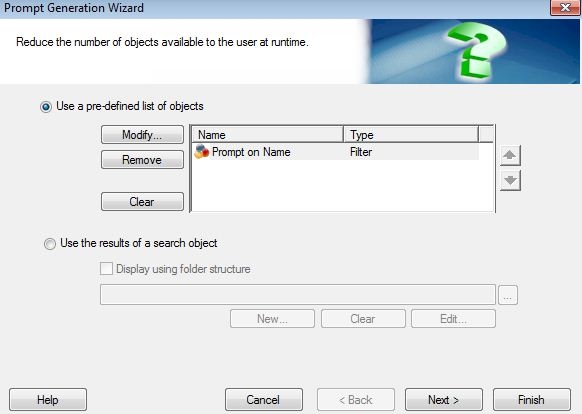
  • Create an object prompt that lists the filter object created at step 1.
ka04W000001489vQAA_0EM4400000027H9.jpeg
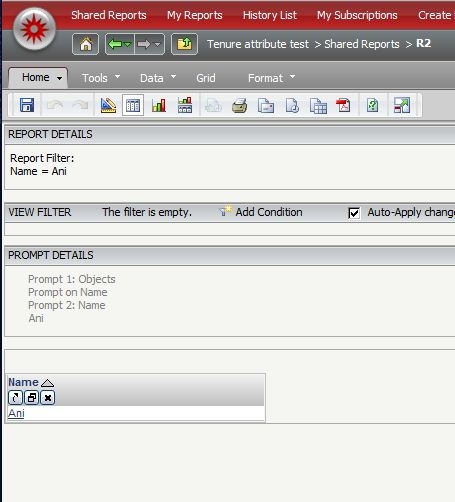
  • Create a report with an attribute in the grid, and the object prompt created in step 2.
  • Execute the report.
ka04W000001489vQAA_0EM4400000027H7.jpeg
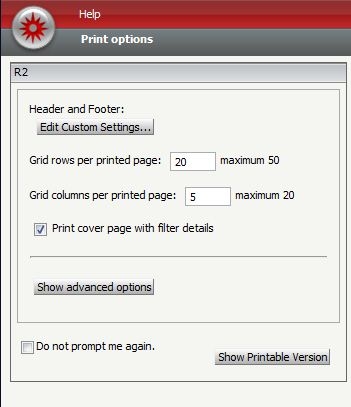
  • Go to Home -> Print, and make sure to check "Print cover page with filter details"
  • Click on "Show Printable Version" button.
ka04W000001489vQAA_0EM4400000027HN.jpeg
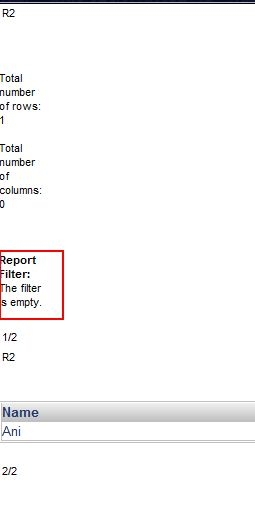
  • Notice how the "Report Filter: The filter is empty" appears as a result.
ka04W000001489vQAA_0EM4400000027HL.jpeg

CAUSE:
The filter is applied as a result of the prompt answer which comes from a filter object that was listed in the Object Prompt.
 
ACTION:
Currently, there is no option to directly show nested prompt answers in the print option or autotext for page header/footer.
 
WORKAROUND:
Create a Report Services Document and use autotext to display prompt answers.  This can be done by following the Technical Notes below:

  • KB32345: List of available auto text macros in Report Services Documents
  • KB31921: How to make auto text {&PromptN&} display as "Null" in exported PDF when PromptN is optional prompt and no answer is selected in MicroStrategy Developer

On a related note, please refer to:

  • KB35073: Is there a way to display prompt answers when using an object prompt based off of pre-selected filters in a Report Services document in MicroStrategy 9.x - 10.x? 


KB404330


Comment

0 comments

Details

Knowledge Article

Published:

July 17, 2017

Last Updated:

November 29, 2018