EducationSoftwareStrategy.com
StrategyCommunity

Knowledge Base

Product

Community

Knowledge Base

TopicsBrowse ArticlesDeveloper Zone

Product

Download SoftwareProduct DocumentationSecurity Hub

Education

Tutorial VideosSolution GalleryEducation courses

Community

GuidelinesGrandmastersEvents
x_social-icon_white.svglinkedin_social-icon_white.svg
Strategy logoCommunity

© Strategy Inc. All Rights Reserved.

LegalTerms of UsePrivacy Policy
  1. Home
  2. Topics

KB404391: Attempting to access a new install on a 64-bit Windows machine results in an error "Retrieving the COM class factory for component with CLSID {C8283F8E-82A4-11D5-BE78-00C94F5FB7CB} failed due to the following error: 80040154 in MicroStrategy Web


Community Admin

• Strategy


Attempting to access a new install on a 64-bit Windows machine results in an error "Retrieving the COM class factory for component with CLSID {C8283F8E-82A4-11D5-BE78-00C94F5FB7CB} failed due to the following error: 80040154 in MicroStrategy Web

SYMPTOM
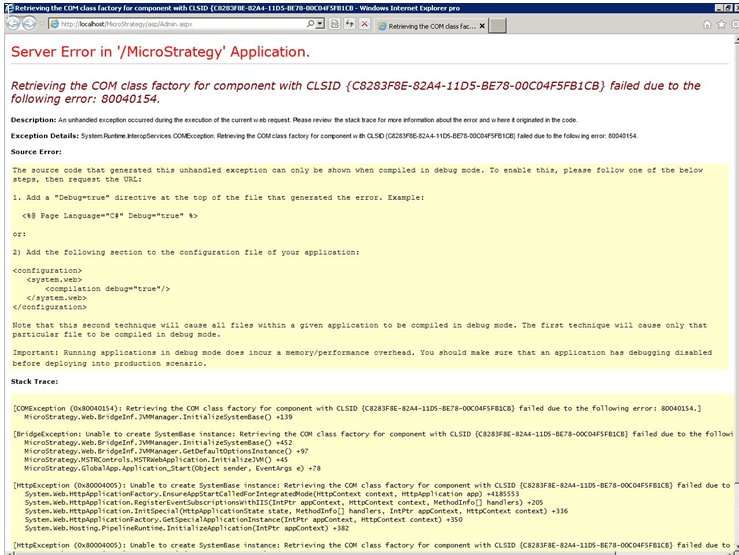
After a new install of Strategy Web 9.2.1 on a 64-bit Windows machine, or when switching from a 32-bit to a 64-bit Windows server machine, users see the following error on attempting to browser to Strategy Web pages:
 

ka04W000000ObScQAK_0EM4400000027Iz.png


Server error in '\Strategy' Application.
Retrieving the COM class factory for component with CLSID {C8283F8E-82A4-11D5-BE78-00C94F5FB7CB} failed due to the following error: 80040154

 
CAUSE
A .dll file may be missing or may not have been registered properly.
 
ACTION
In previous cases, registering the MBBRIBAS_64.DLL in the Program Files\Common Files\Strategy directory has resolved the issue with the following command (make sure to run cmd.exe as an Administrator):
 

regsvr32 MBBRIBAS_64.DLL

 
If this does not resolve the issue, contact Strategy Technical Support. 
 
This is referenced by internal reference number KB404391

KB404391


Comment

0 comments

Details

Knowledge Article

Published:

May 19, 2017

Last Updated:

November 13, 2018