EducationSoftwareStrategy.com
StrategyCommunity

Knowledge Base

Product

Community

Knowledge Base

TopicsBrowse ArticlesDeveloper Zone

Product

Download SoftwareProduct DocumentationSecurity Hub

Education

Tutorial VideosSolution GalleryEducation courses

Community

GuidelinesGrandmastersEvents
x_social-icon_white.svglinkedin_social-icon_white.svg
Strategy logoCommunity

© Strategy Inc. All Rights Reserved.

LegalTerms of UsePrivacy Policy
  1. Home
  2. Topics

KB40449: .Net Compilation error on MicroStrategy Web Universal, Mobile, WebServices deploy in IIS Manager


Community Admin

• Strategy


After installing MicroStrategy Web on IIS with all required features and roles installed and then trying to enter the .Net compilation settings under the virtual directory 'MicroStrategy' in the IIS Manager, the following error is received

SYMPTOM: 
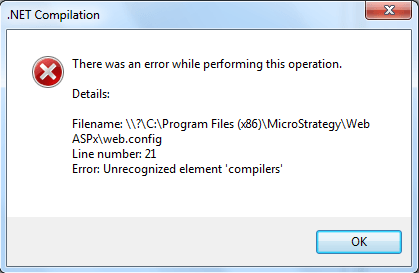
After installing Strategy Web on IIS with all required features and roles installed and then trying to enter the .Net compilation settings under the virtual directory 'Strategy' in the IIS Manager, the following error is received: 
ka04W000000OdVbQAK_0EM440000002774.png


There was an error while performing this operation.
Details:
Filename:\\?\C:\Program Files(x86)\MicroStrategy\WebASPx\web.config
Line number: 21
Error: Unrecognized element 'compilers'


STEPS TO REPRODUCE: 
1. Install Strategy Web Universal on IIS with all required features and roles installed.
2. In IIS Manager, expand Sites > Default Web Sites and select 'Strategy' virtual directory.
3. In right pane double click .Net Compilation and the error will appear.
 
CAUSE:
This is a known issue with Strategy Web 9.x.
 
ACTION: 
Contact Strategy Technical Support for an update with this issue.
 
 
WORKAROUND:
Delete below lines from web.config in the file mentioned in above error message:

<compilers>
 <compiler language="vb" type="Microsoft.VisualBasic.VBCodeProvider, System, Version=2.0.0.0, Culture=neutral, PublicKeyToken=B77A5C561934E089" extension=".VB" compilerOptions="/imports:Microsoft.VisualBasic,System,System.Collections,System.Configuration,System.Data,System.Drawing,System.Web,System.Web.UI,System.Web.UI.HtmlControls,System.Web.UI.WebControls" />
 </compilers>
 <buildProviders>
 <add extension=".asp" type="System.Web.Compilation.PageBuildProvider" />
 </buildProviders> 


Make sure:
1. Saved a backup copy of the web.config file before changing it.
2. Do NOT remove the <compilation> element before and after these lines.
 
 
The Strategy Internal Reference Number for the issue discussed in this technical note is 580917.


Comment

0 comments

Details

Knowledge Article

Published:

June 21, 2017

Last Updated:

June 21, 2017