EducationSoftwareStrategy.com
StrategyCommunity

Knowledge Base

Product

Community

Knowledge Base

TopicsBrowse ArticlesDeveloper Zone

Product

Download SoftwareProduct DocumentationSecurity Hub

Education

Tutorial VideosSolution GalleryEducation courses

Community

GuidelinesGrandmastersEvents
x_social-icon_white.svglinkedin_social-icon_white.svg
Strategy logoCommunity

© Strategy Inc. All Rights Reserved.

LegalTerms of UsePrivacy Policy
  1. Home
  2. Topics

KB40455: When attempting to install MicroStrategy 9.x or 10.x, after applying license key the installation will not allow users to continue with the installation in Windows and Unix.


Community Admin

• Strategy


This KB addresses an issue seen when trying to apply a license key during installation.

SYMPTOM:
When attempting to install Strategy 9.x or 10.x in Unix command line, users receive this error after inputing the license key:

ka04W000000OhkyQAC_0EM440000002HOA.png


Sample Code/Error
Invalid license key. Please verify that you  have the correct key for your version of Strategy. Different version may require a new license key 
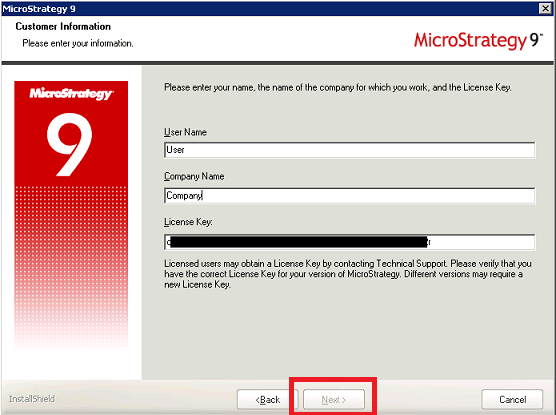
 
When attempting to install Strategy 9.x or 10.x in Windows or using GUI with Linux, the next button is grayed out which does not allow users to continue:

ka04W000000OhkyQAC_0EM440000002HOC.png

 
CAUSE:
There are several different causes of this issue:

  1. Users are attempting to use a license key to install a different version of Strategy. Each license key is meant for one specific version of Strategy, so if a version other than the one the license key is meant for is being installed, this error will be thrown.
  2. Spaces or 'ghost' characters are present before or after the license key.

ACTION:

  1. Verify that the version that corresponds with the license key is being installed.
  2. Verify that there are no spaces or ghost characters before or after the license key.

Comment

0 comments

Details

Knowledge Article

Published:

April 14, 2017

Last Updated:

April 14, 2017