EducationSoftwareStrategy.com
StrategyCommunity

Knowledge Base

Product

Community

Knowledge Base

TopicsBrowse ArticlesDeveloper Zone

Product

Download SoftwareProduct DocumentationSecurity Hub

Education

Tutorial VideosSolution GalleryEducation courses

Community

GuidelinesGrandmastersEvents
x_social-icon_white.svglinkedin_social-icon_white.svg
Strategy logoCommunity

© Strategy Inc. All Rights Reserved.

LegalTerms of UsePrivacy Policy
  1. Home
  2. Topics

KB40459: The option "Current state" of a selector is disabled when running a Report Services document using an Intelligent cube as dataset in MicroStrategy Developer 9.x


Stefan Zepeda

Salesforce Solutions Architect • Strategy


The option "Current state" of a selector is disabled when running a Report Services document using an Intelligent cube as dataset in MicroStrategy Developer 9.x

SYMPTOM:
 
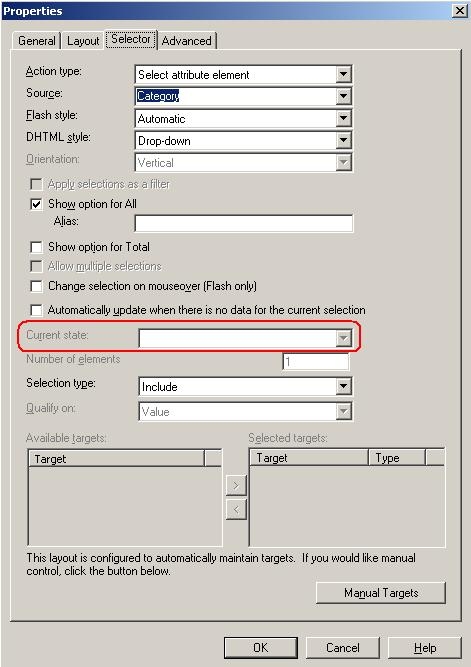
In Strategy Developer 9.x, the option "Current state" of a selector is disabled when running a Report Services document using an Intelligent cube as dataset.
 
 
STEPS TO REPRODUCE:
 
Follow the steps below to reproduce the issue with Strategy Tutorial project:
    1. In Strategy Developer, create an Intelligent cube with the attribute Category in the row.
    2. Save the cube and publish it.
    3. Create a Report Services document, use the cube created at step1 as dataset.
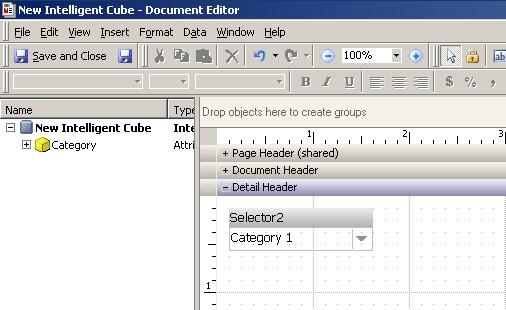
    4. Add an element selector with the attribute Category, as shown below:


ka02R000000kWyDQAU_0EM440000002DDJ.jpeg


    1. Right click the selector and open "Properties" window, note that the "Current state" option is disabled, as shown below:


ka02R000000kWyDQAU_0EM440000002DDH.jpeg

 
CAUSE:
 
This is a known issue with Strategy Developer 9.x. 
 
 
ACTION:
 
Strategy will continue to investigate and post updates as soon as they are available.


Comment

0 comments

Details

Knowledge Article

Published:

April 13, 2017

Last Updated:

April 13, 2017