EducationSoftwareStrategy.com
StrategyCommunity

Knowledge Base

Product

Community

Knowledge Base

TopicsBrowse ArticlesDeveloper Zone

Product

Download SoftwareProduct DocumentationSecurity Hub

Education

Tutorial VideosSolution GalleryEducation courses

Community

GuidelinesGrandmastersEvents
x_social-icon_white.svglinkedin_social-icon_white.svg
Strategy logoCommunity

© Strategy Inc. All Rights Reserved.

LegalTerms of UsePrivacy Policy
  1. Home
  2. Topics

KB40483: The scrollbar does not appear on a panel stack when the content overflow is set to "scroll" in Editable mode in MicroStrategy Web 9.x.


Community Admin

• Strategy


SYMPTOM:
 
In Strategy Web 9.x, when an grid extends below the panel stack container, the scrollbar at the panel stack level does not appear when content overflow is set to "scroll" in Editable mode.
 
STEPS TO REPRODUCE:
  • Create report with Category, Subcategory, and Cost.
  • Add the report to a blank dashboard as a dataset.
  • Add a panel stack to the dashboard
  • Add a grid to the panel stack that extends below the panel stack.
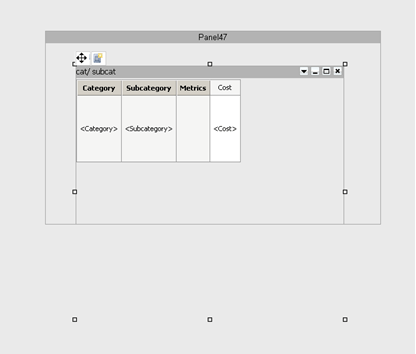
  • Add the dataset to grid. The dashboard should appear as seen below in design view.
ka04W000000OfxUQAS_0EM44000000274S.png
  • Set the content overflow of the panel stack to "scroll" in "properties and formatting."
  • Set the grid overflow of the grid to "scroll" in "properties and formatting."
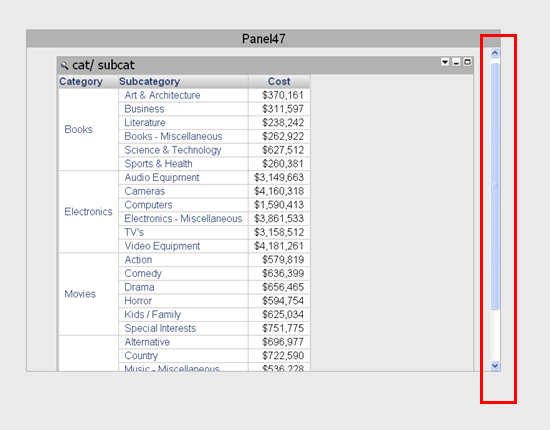
  • View the dashboard in Interactive mode, notice that the panel stack is scrollable as seen below.
ka04W000000OfxUQAS_0EM44000000274T.png
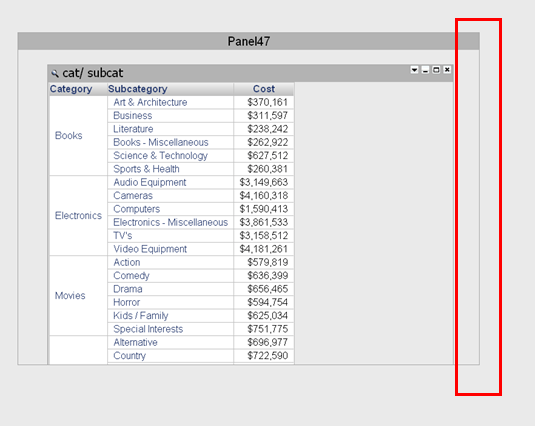
  • View the dashboard in Editable Mode and notice the panel stack is not scrollable as seen below.
ka04W000000OfxUQAS_0EM44000000274Z.png

CAUSE:
 
This is a known issue with Strategy Web 9.x.
 
ACTION:
 
Contact Strategy Technical Support for an update on this issue.
 
WORKAROUND:
 
Set the height of the grid to fit within the size of the panel stack. This will cause the scroll bar on the grid to show up instead of the panel stack scroll bar and will work in all view modes.


Comment

0 comments

Details

Knowledge Article

Published:

July 17, 2017

Last Updated:

July 17, 2017