EducationSoftwareStrategy.com
StrategyCommunity

Knowledge Base

Product

Community

Knowledge Base

TopicsBrowse ArticlesDeveloper Zone

Product

Download SoftwareProduct DocumentationSecurity Hub

Education

Tutorial VideosSolution GalleryEducation courses

Community

GuidelinesGrandmastersEvents
x_social-icon_white.svglinkedin_social-icon_white.svg
Strategy logoCommunity

© Strategy Inc. All Rights Reserved.

LegalTerms of UsePrivacy Policy
  1. Home
  2. Topics

KB40502: "Essbase Error(1030008): NULL argument (2) passed to ESSAPI function EssLogin" error message appears when opening MDX catalog in MicroStrategy Developeragainst Hyperion Essbase


Community Admin

• Strategy


Use XMLATest.exe tool to obtain the correct name for the Data sources available in the URL

SYMPTOM:
 
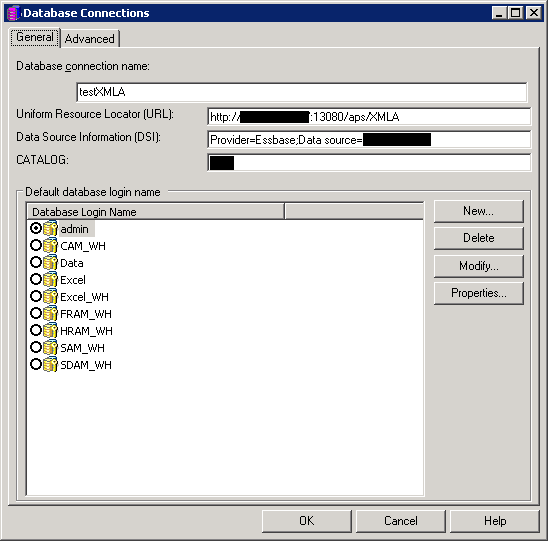
After setting up a Database instance in Strategy Developer to connect to Hyperion Essbase 11.1.2 cubes like the following:
 

ka04W000000OfDLQA0_0EM4400000029kh.png


URL: http://<Server_Name>:<Port>/XMLA
DSI: Provider:Essbase;Data source=<Server_Name>
Catalog: <Catalog_Name>
 
 
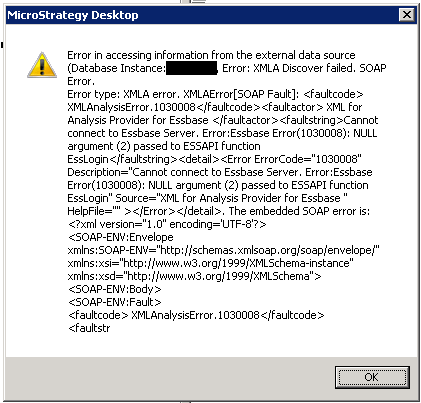
Opening the MDX cube catalog in Strategy Developer shows the error message below:
 

ka04W000000OfDLQA0_0EM4400000029kj.png


Error trying to get the information from the data source(DB Instance, Error:XMLA Discover failed. SOAP Error.)
Error type; XMLA error. XMLA error: <faultcode> XMLAnalysisErrror.1030008</faultcode><faultactor> XML for Analysis Provider for Essbase </faultactor><faultstring>Cannot connect to Essbase Server. Error:Essbase Error(1030008): NULL argument (2) passed to ESSAPI function EssLogin</faultstring><detail><Error ErrorCode="1030008" Description="Cannot connect to Essbase Server. Error:Essbase Error(1030008): NULL argument (2) passed to ESSAPI function EssLogin" Source = "XML for Analysis for Essbase" HelpFile=""></Error></detail> The embeded SOAP error is: <?xml version="1.0" encoding = 'UTF-8'?>
<SOAP-ENV: Envelope xmlns:SOAP-ENV="http://schemas.xmlsoap.org/soap/envelope/" xmlns:xsi="http://www.w3.org/1999/XMLSchema-instance"
xmlns:xsd="http://www.w3.org/1999/XMLSchema">
<SOAP-ENV:Body>
<SOAP-ENV:Fault>
<faultcode> XMLAnalysisError.103
Comparing functions with ESSAPI for C, and the error code 1030008, the appearant "NULL argument (2)


CAUSE:
 
NULL argument (2) passed to ESSAPI function EssLogin indicates that there is a problem with the Data Source Information (DSI) string on the connection configuration.
 
The Data source=<servername> specified is not correct or the syntax is incorrect causing the parameter to be unrecognized.
 
ACTION:
 
Use XMLATest.exe tool to obtain the correct name for the Data sources available in the URL.
Obtain the list of valid Data source names using only the the URL and authentication parameters like described in KB14715: How to use the XMLA Connectivity Test Tool available in MicroStrategy 9.x
Identify the valid Data Source Names available and use the exact same string under DataSourceInfo in the Database instance configuration. 
 
The result should resemble the following: 

Get SOAP reply:

================================ 

<row>


<DataSourceName>test-essbase.domian.com:1423</DataSourceName>

<DataSourceDescription>Essbase OLAP Server</DataSourceDescription>

<DataSourceInfo>Provider=Essbase;Data Source=test-essbase.domain:1423</DataSourceInfo>

<ProviderName>Essbase XML for Analysis</ProviderName>

<ProviderType><MDP/></ProviderType>

<AuthenticationMode>Authenticated</AuthenticationMode></row>

 ================================

End of XMLATest run. Press <ENTER> to quit.

 
Note: Depending on the current configuration, the Data Source Info can contain the Data Source in the form of <full_machine_name>:<port> and has to be specified in that same way in the database connection information.
 
Example:

URL: http://<Server_Name>:<Port>/XMLA
DSI: Provider:Essbase;Data source=<Full_Server_Name>:<port>
Catalog: <Catalog_Name>


Comment

0 comments

Details

Knowledge Article

Published:

June 5, 2017

Last Updated:

June 5, 2017