EducationSoftwareStrategy.com
StrategyCommunity

Knowledge Base

Product

Community

Knowledge Base

TopicsBrowse ArticlesDeveloper Zone

Product

Download SoftwareProduct DocumentationSecurity Hub

Education

Tutorial VideosSolution GalleryEducation courses

Community

GuidelinesGrandmastersEvents
x_social-icon_white.svglinkedin_social-icon_white.svg
Strategy logoCommunity

© Strategy Inc. All Rights Reserved.

LegalTerms of UsePrivacy Policy
  1. Home
  2. Topics

KB40506: Non-administrator users get a message "You do not have Write access to the Attribute object" when trying to copy freeform SQL reports in MicroStrategy Developer 9.x - 10.x


Stefan Zepeda

Salesforce Solutions Architect • Strategy


This technical note describes an issue that occurs when trying to copy a freeform SQL report in MicroStrategy Developer.

SYMPTOM:
Consider that a project has the default Access Control List (ACL) specified for freeform SQL objects (set through Project Configuration > Security > Set FFSQL and MDX objects default security):


Browse:GrantRead:GrantWrite:DenyDelete:DenyControl:DenyUse:GrantExecute:GrantData VolumeProgress ODBC DriverProgress JDBC DriverNative ODBC Driver3,948,159 rows and 43 columns44.46s57.06s57sPropertyFilter AFilter BDateTime#6/29/2001##6/29/2001#Day2929DayOfWeekDssDayFridayDssDaySundayDynamicDayOffset<Application Defined>0DynamicDateDssTimeNotDynamicTimeDssTimeTodayHour00IsGmtFalseFalseMiliSeconds00Minutes00ModeDssDateTimeModeLocaleInsensitiveDssDateTimeModeLocaleInsensitiveMonthDssMonthJuneDssMonthJuneName""""Seconds00Week51Year20012001AdministratorFull ControlEveryoneViewPublic / GuestView


Browse:GrantRead:GrantWrite:DenyDelete:DenyControl:DenyUse:GrantExecute:GrantData VolumeProgress ODBC DriverProgress JDBC DriverNative ODBC Driver3,948,159 rows and 43 columns44.46s57.06s57sPropertyFilter AFilter BDateTime#6/29/2001##6/29/2001#Day2929DayOfWeekDssDayFridayDssDaySundayDynamicDayOffset<Application Defined>0DynamicDateDssTimeNotDynamicTimeDssTimeTodayHour00IsGmtFalseFalseMiliSeconds00Minutes00ModeDssDateTimeModeLocaleInsensitiveDssDateTimeModeLocaleInsensitiveMonthDssMonthJuneDssMonthJuneName""""Seconds00Week51Year20012001AdministratorFull ControlEveryoneViewPublic / GuestView


Browse:GrantRead:GrantWrite:DenyDelete:DenyControl:DenyUse:GrantExecute:GrantData VolumeProgress ODBC DriverProgress JDBC DriverNative ODBC Driver3,948,159 rows and 43 columns44.46s57.06s57sPropertyFilter AFilter BDateTime#6/29/2001##6/29/2001#Day2929DayOfWeekDssDayFridayDssDaySundayDynamicDayOffset<Application Defined>0DynamicDateDssTimeNotDynamicTimeDssTimeTodayHour00IsGmtFalseFalseMiliSeconds00Minutes00ModeDssDateTimeModeLocaleInsensitiveDssDateTimeModeLocaleInsensitiveMonthDssMonthJuneDssMonthJuneName""""Seconds00Week51Year20012001AdministratorFull ControlEveryoneViewPublic / GuestView


Browse:GrantRead:GrantWrite:DenyDelete:DenyControl:DenyUse:GrantExecute:GrantData VolumeProgress ODBC DriverProgress JDBC DriverNative ODBC Driver3,948,159 rows and 43 columns44.46s57.06s57sPropertyFilter AFilter BDateTime#6/29/2001##6/29/2001#Day2929DayOfWeekDssDayFridayDssDaySundayDynamicDayOffset<Application Defined>0DynamicDateDssTimeNotDynamicTimeDssTimeTodayHour00IsGmtFalseFalseMiliSeconds00Minutes00ModeDssDateTimeModeLocaleInsensitiveDssDateTimeModeLocaleInsensitiveMonthDssMonthJuneDssMonthJuneName""""Seconds00Week51Year20012001AdministratorFull ControlEveryoneViewPublic / GuestView


Browse:GrantRead:GrantWrite:DenyDelete:DenyControl:DenyUse:GrantExecute:GrantData VolumeProgress ODBC DriverProgress JDBC DriverNative ODBC Driver3,948,159 rows and 43 columns44.46s57.06s57sPropertyFilter AFilter BDateTime#6/29/2001##6/29/2001#Day2929DayOfWeekDssDayFridayDssDaySundayDynamicDayOffset<Application Defined>0DynamicDateDssTimeNotDynamicTimeDssTimeTodayHour00IsGmtFalseFalseMiliSeconds00Minutes00ModeDssDateTimeModeLocaleInsensitiveDssDateTimeModeLocaleInsensitiveMonthDssMonthJuneDssMonthJuneName""""Seconds00Week51Year20012001AdministratorFull ControlEveryoneViewPublic / GuestView


Browse:GrantRead:GrantWrite:DenyDelete:DenyControl:DenyUse:GrantExecute:GrantData VolumeProgress ODBC DriverProgress JDBC DriverNative ODBC Driver3,948,159 rows and 43 columns44.46s57.06s57sPropertyFilter AFilter BDateTime#6/29/2001##6/29/2001#Day2929DayOfWeekDssDayFridayDssDaySundayDynamicDayOffset<Application Defined>0DynamicDateDssTimeNotDynamicTimeDssTimeTodayHour00IsGmtFalseFalseMiliSeconds00Minutes00ModeDssDateTimeModeLocaleInsensitiveDssDateTimeModeLocaleInsensitiveMonthDssMonthJuneDssMonthJuneName""""Seconds00Week51Year20012001AdministratorFull ControlEveryoneViewPublic / GuestView


Consider that an administrator user creates a new freeform SQL report with two attributes 'Attr A' and 'Attr B' as well as a metric 'Met A'. If a non-administrator user logs in from Strategy Developer 9.x - 10.x and attempts to copy/paste the above freeform SQL report into another folder, the following message comes up:
 

ka02R000000kbggQAA_0EM440000002DCT.png


You do not have Write access to the Attribute object 'Attr A'.

 
On clicking 'OK' above and refreshing the target folder, the freeform report does get copied correctly. The same non-administrator user is able to execute the report fine as well.
 
CAUSE:
This is a known issue with Strategy Developer 9.x - 10.x
 
ACTION:
Strategy is investigating this issue and will continue posting updates as soon as they become available.
 
WORKAROUND:
The ACL specified at the project level for freeform SQL objects (under Project Configuration > Security > Set FFSQL and MDX objects default security) is only for new objects. Hence, to avoid this issue for new freeform SQL reports to be created from Developer, the ACL can be updated to grant 'Write' access to the 'Everyone' group as shown below:
 

ka02R000000kbggQAA_0EM440000002DCO.png

 
To workaround this issue for existing freeform SQL reports, the following changes will need to be made for ALL reports individually:
 

  • Run a component search for the freeform SQL report from Strategy Developer by navigating to the report location and then right click the report > Search for Components.
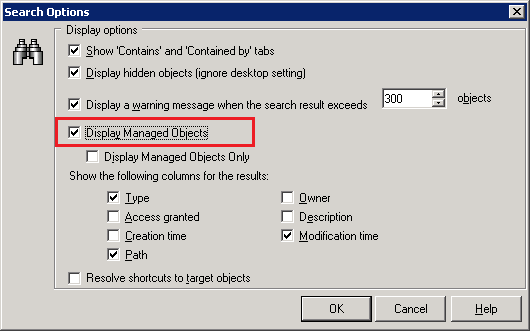
  • Go to Tools menu > Options and enable 'Display Managed Objects':
     
ka02R000000kbggQAA_0EM440000002DCY.png
  • For each attribute object in the freeform SQL report whose path is shown to be, go to its Properties > Security, and grant 'Write' access to the Everyone group:
     
ka02R000000kbggQAA_0EM440000002DCR.png
ka02R000000kbggQAA_0EM440000002DCa.png

Comment

0 comments

Details

Knowledge Article

Published:

June 12, 2017

Last Updated:

June 12, 2017