EducationSoftwareStrategy.com
StrategyCommunity

Knowledge Base

Product

Community

Knowledge Base

TopicsBrowse ArticlesDeveloper Zone

Product

Download SoftwareProduct DocumentationSecurity Hub

Education

Tutorial VideosSolution GalleryEducation courses

Community

GuidelinesGrandmastersEvents
x_social-icon_white.svglinkedin_social-icon_white.svg
Strategy logoCommunity

© Strategy Inc. All Rights Reserved.

LegalTerms of UsePrivacy Policy
  1. Home
  2. Topics

KB40509: "You do not have Read access to the DB Table object [object_name] " error occurs when editing a table object in MicroStrategy 2021


Stefan Zepeda

Salesforce Solutions Architect • Strategy


When a non-administrator user attempts to edit a table object in MicroStrategy Developer or Workstation, an error occurs.

SYMPTOM:
When a non-administrator user attempts to edit a table object in Strategy Developer or Workstation, an error occurs.
Sample Code/Error
"You do not have Read access to the DB Table object 'object_name'"
CAUSE:
This user does not have Modify permissions for this object.
ACTION:
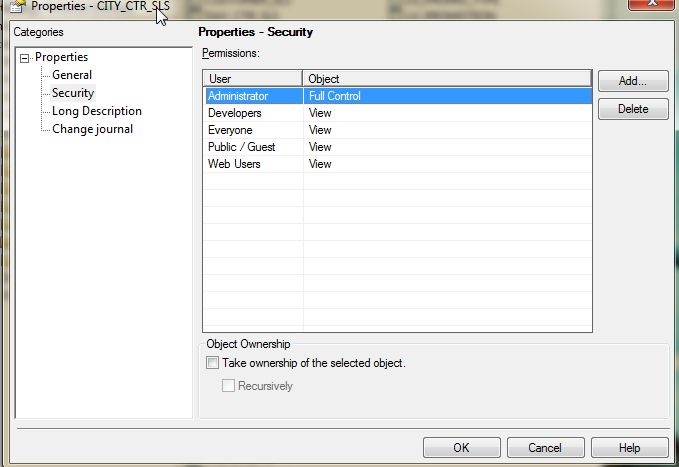
If this is a developer user who must have access to edit tables, either grant them directly in the ACL which is found in the Properties for the table object:
ka0PW0000002wzBYAQ_0EM440000002DCr.jpeg

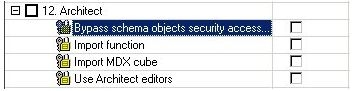
Additionally, the Administrator can also apply the Architect privilege "Bypass schema object access security check" for the user in question, by editing the user directly through the user manager, under the  User definition-> 'project access' section as shown below:
ka0PW0000002wzBYAQ_0EM440000002DCx.jpeg

Comment

0 comments

Details

Knowledge Article

Published:

April 6, 2017

Last Updated:

August 12, 2024