EducationSoftwareStrategy.com
StrategyCommunity

Knowledge Base

Product

Community

Knowledge Base

TopicsBrowse ArticlesDeveloper Zone

Product

Download SoftwareProduct DocumentationSecurity Hub

Education

Tutorial VideosSolution GalleryEducation courses

Community

GuidelinesGrandmastersEvents
x_social-icon_white.svglinkedin_social-icon_white.svg
Strategy logoCommunity

© Strategy Inc. All Rights Reserved.

LegalTerms of UsePrivacy Policy
  1. Home
  2. Topics

KB40535: Custom format applied to a metric via an advanced threshold is displayed incorrectly in the Excel formula bar after exporting the report to Excel from MicroStrategy Web 9.x


Community Admin

• Strategy


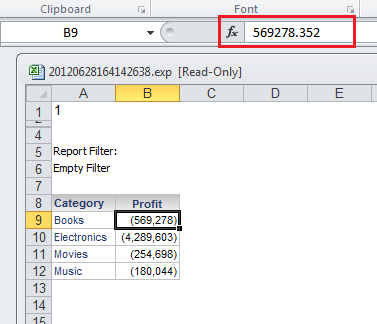
When a grid is exported to Excel from MicroStrategy Web 9.x, a custom format in an advanced threshold applied to a metric is reflected correctly in the cell value but reflected incorrectly in the formula bar.

SYMPTOM:
When a grid is exported to Excel from Strategy Web 9.x, a custom format in an advanced threshold applied to a metric is reflected correctly in the cell value but reflected incorrectly in the formula bar.
STEPS TO REPRODUCE:
Follow these steps to reproduce in a Strategy Tutorial project.
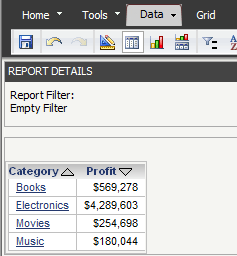
  • Create a report with Category and Profit.
  • Execute the report in Strategy Web 9.x:
ka04W000000OdugQAC_0EM440000002752.png
  • Go to the Advanced Thresholds Editor.
  • Create a threshold on Profit with the condition 'Is Not Null'.
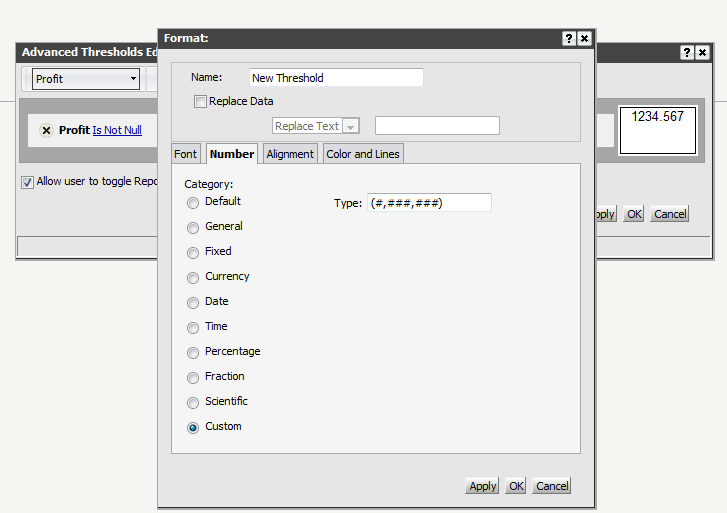
  • Format the threshold with a custom number type:


    (#,###,###)


ka04W000000OdugQAC_0EM440000002753.png
  • Apply and export the report to Excel.
  • Notice that the format is applied on the cell values but when clicking on the cell to look at the formula in the formula bar, the bar will display the original value:
ka04W000000OdugQAC_0EM44000000274y.png

 
CAUSE:
This is a limitation of Microsoft Excel. Strategy passes the original value and format to Excel, but does not control how Excel displays the value and format in the formula bar.


Comment

0 comments

Details

Knowledge Article

Published:

June 14, 2017

Last Updated:

June 14, 2017