EducationSoftwareStrategy.com
StrategyCommunity

Knowledge Base

Product

Community

Knowledge Base

TopicsBrowse ArticlesDeveloper Zone

Product

Download SoftwareProduct DocumentationSecurity Hub

Education

Tutorial VideosSolution GalleryEducation courses

Community

GuidelinesGrandmastersEvents
x_social-icon_white.svglinkedin_social-icon_white.svg
Strategy logoCommunity

© Strategy Inc. All Rights Reserved.

LegalTerms of UsePrivacy Policy
  1. Home
  2. Topics

KB40543: How to display the filter definition instead of the file name of the filter when using "shortcut to filter" as the report filter in MicroStrategy Developer 9.x and newer.


Stefan Zepeda

Salesforce Solutions Architect • Strategy


This KB shows users hoe to display the filter definition instead of the file name of the filter when using "shortcut to filter" as the report filter.

SYMPTOM:
When using "shortcut to filter" as the report filter, the report details section returns the name of the filter in Strategy Developer 9.x while the filter definition can be viewed while the report executed in Web.
 
Example:
The filter object is named "r" which filters on Year attribute. It will show "r" in Developer and show "Year = 2009, 2010" in the Web as shown below.

ka02R000000kaK9QAI_0EM440000002HO7.png


ACTION:
Navigate to report->data-> Report Details Properties->Filter Details - Contents. Modify the "Expand shortcut filters" option as below and the filter definition can be seen in Strategy Developer.
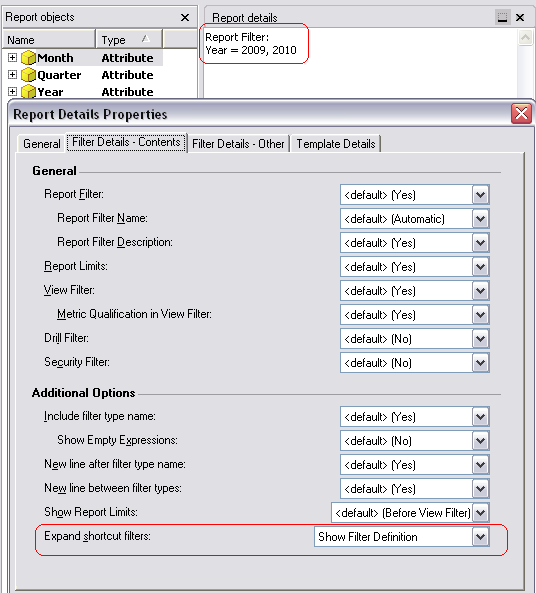
ka02R000000kaK9QAI_0EM440000002HO6.png

Comment

0 comments

Details

Knowledge Article

Published:

May 9, 2017

Last Updated:

May 9, 2017