EducationSoftwareStrategy.com
StrategyCommunity

Knowledge Base

Product

Community

Knowledge Base

TopicsBrowse ArticlesDeveloper Zone

Product

Download SoftwareProduct DocumentationSecurity Hub

Education

Tutorial VideosSolution GalleryEducation courses

Community

GuidelinesGrandmastersEvents
x_social-icon_white.svglinkedin_social-icon_white.svg
Strategy logoCommunity

© Strategy Inc. All Rights Reserved.

LegalTerms of UsePrivacy Policy
  1. Home
  2. Topics

KB40557: Windows authentication does not work when using the ApplicationPoolIdentity for the MicroStrategyWebPool in IIS 7 in MicroStrategy Web 9.2.1


Community Admin

• Strategy


Windows authentication does not work when using the ApplicationPoolIdentity for the MicroStrategyWebPool in IIS 7 in MicroStrategy Web 9.2.1

SYMPTOM:
In Strategy Web 9.2.1, windows authentication may fail for users with the following error message, even when the correct user ID and password are provided:


Error in login
You cannot login as Windows User. Please ask the Strategy Server Administrator to link this Windows User account to a Strategy Server User or ask them to set the Web server properly.'
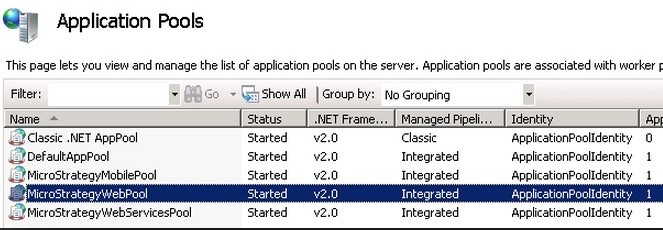
  
CAUSE:
One possible cause may be that the StrategyWebPool in IIS 7 is using the  ApplicationPoolIdentity as its identity, like shown below:
 

ka04W000001MKopQAG_0EM44000000275U.jpeg

 
When using the ApplicationPoolIdentity, domain users cannot be authenticated.
 
ACTION:
Replace the ApplicationPoolIdentity with the NetworkService identity for the StrategyWebPool identity in IIS 7 manager, like shown below:

 

ka04W000001MKopQAG_0EM44000000275V.jpeg

 
Third Party Software Installation Warning:
The third-party product(s) discussed in this technical note is manufactured by vendors independent of Strategy. Strategy makes no warranty, express, implied or otherwise, regarding this product, including its performance or reliability.


Comment

0 comments

Details

Knowledge Article

Published:

April 6, 2017

Last Updated:

April 7, 2017