EducationSoftwareStrategy.com
StrategyCommunity

Knowledge Base

Product

Community

Knowledge Base

TopicsBrowse ArticlesDeveloper Zone

Product

Download SoftwareProduct DocumentationSecurity Hub

Education

Tutorial VideosSolution GalleryEducation courses

Community

GuidelinesGrandmastersEvents
x_social-icon_white.svglinkedin_social-icon_white.svg
Strategy logoCommunity

© Strategy Inc. All Rights Reserved.

LegalTerms of UsePrivacy Policy
  1. Home
  2. Topics

KB40574: Error message of "[Oracle]ORA-01012: not logged on..." appears when running report in MicroStrategy Desktop or Web against Oracle database.


Community Admin

• Strategy


Error message of "ORA-01012: not logged on..." appears when running report in MicroStrategy Desktop or Web against Oracle database.

SYMPTOM:
 
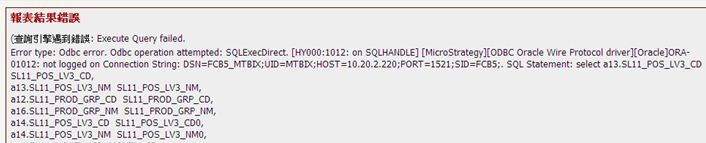
Error message of "ORA-01012: not logged on..." appears when running report in Strategy Desktop or Web 10.x against Oracle database as shown below:
 

ka04W00000148KuQAI_0EM440000002JFL.jpeg


Execute Query failed. Error type: Odbc error. Odbc operation attempted: SQLExecDirect. ORA-01012: 
not logged on Connectiong String: ... 
 
Once this error message appears, every report would fail to run. And there is no connection session from Strategy observed on Database side. After restarting the Intelligence Server, it works fine. However, the issue may happen again later.
 
CAUSE:
 
One possible cause is the cached database connection is using a session that has been terminated by Oracle.
 
ACTION:
 
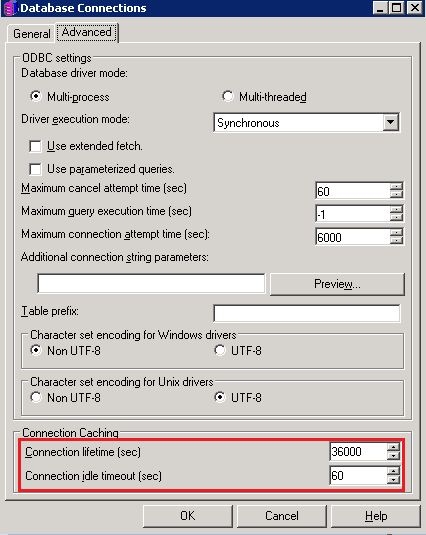
Go to Administration>Configuration Manager>Database Instance. Modify the specific Database Instance and set the proper value of Connection lifetime and Connection Idle timeout as shown below:
 

ka04W00000148KuQAI_0EM440000002JFU.jpeg

 
In this case, decrease the Connection lifetime to be shorter than the Relational Database Management System (RDBMS) limit and set the Connection Idle timeout as RDBMS limit minus the time of the longest job.
 
Refer to below Technical Note for more information about Connection lifetime and Connection Idle timeout settings:
 
KB5598 : What are the "Connection lifetime" and "Connection Idle Timeout" options under the Database Connection Caching section in Strategy Intelligence Server?


Comment

0 comments

Details

Knowledge Article

Published:

May 25, 2017

Last Updated:

May 25, 2017