Users configuring the Strategy Intelligence Server 2021 will find a configuration option "User Affinity Cluster" and a related setting "Subscription Load Balancing." These settings can be accessed from Workstation by right mouse click Environment->Properties->All Settings as shown below
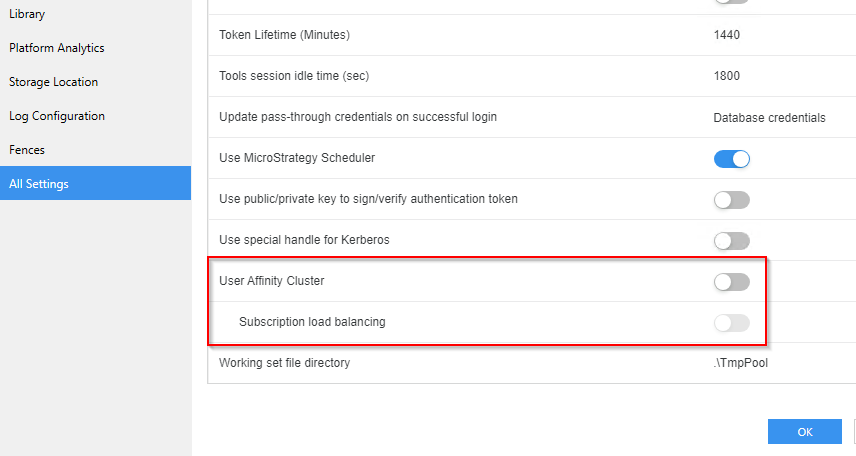
and from Developer toolbar Administration->Server->Configuration Strategy Intelligence Server->Advanced tab as shown below:
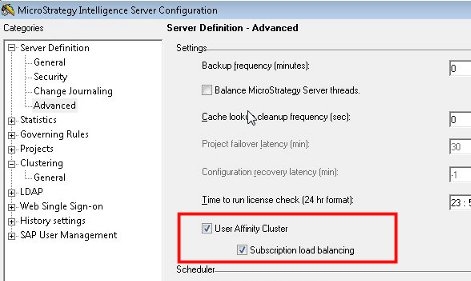
These are settings designed to improve the scalability and performance of the Intelligence Server process.
When a user logs into the Intelligence Server for the first time, the Intelligence Server must retrieve, from file or database, the users "Inbox" or history list messages. These messages then must be synchronized across the cluster when the user has sessions open on more than one node of an Intelligence Server cluster. The user affinity cluster setting works to preferentially create new sessions for a user in an Intelligence Server cluster on the same node that the user already has existing sessions on. This will reduce the number of history list retrievals that must be done at login, and also reduce the synchronization overhead for
The ability to set the Subscription Load Balancing option is only available if the User Affinity Cluster setting is enabled. By default, subscription job load balancing is enabled in a cluster and follows the load balance factor set in the Intelligence Server Configuration -> Clustering -> General dialog box for the cluster nodes. However, if User Affinity Cluster is enabled, users may want to maximize the effect of this setting by enabling the Subscription load balancing option as well. When both User Affinity Cluster and Subscription load balancing are enabled, subscription execution will be routed to those server nodes where there is an existing user session of the subscription recipient. If more than one node has existing sessions of that recipient, then it will distribute subscription execution among those nodes(with existing sessions) based on the load factor previously configured. By comparison, if User Affinity Cluster is enabled while Subscription load balancing is disabled, user sessions for the subscription recipients will be created on all nodes in the cluster to distribute subscription job load.
