EducationSoftwareStrategy.com
StrategyCommunity

Knowledge Base

Product

Community

Knowledge Base

TopicsBrowse ArticlesDeveloper Zone

Product

Download SoftwareProduct DocumentationSecurity Hub

Education

Tutorial VideosSolution GalleryEducation courses

Community

GuidelinesGrandmastersEvents
x_social-icon_white.svglinkedin_social-icon_white.svg
Strategy logoCommunity

© Strategy Inc. All Rights Reserved.

LegalTerms of UsePrivacy Policy
  1. Home
  2. Topics

How to pass multiple selector values as prompt answers of the second document via URL API (MicroStrategy Web 9.4.1+)


Community Admin

• Strategy


Starting with the release of Strategy ONE (March 2024), dossiers are also known as dashboards.

Description

Strategy users may want to pass multiple selector values as prompted answers to another Report Services document.
To do this, follow the steps below:
 

  • Create a report with three attributes: Category, Region, and Quarter.

    Make sure all attributes are from different hierarchies.
  • Create Dashboard B with the above report with three value prompts for each attribute above.
  • Create Dashboard A with the above report as the dataset.
  • In the Dashboard A, create three selectors:
    • Selector one selects Category element
    • Selector two selects Region element
    • Selector three selects Quarter element
  • Create a panel stack.
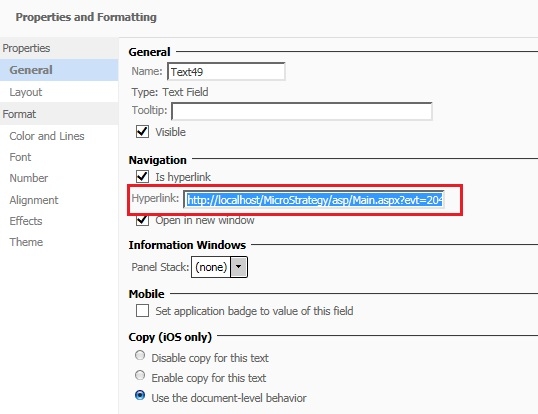
  • Create a text link inside the panel stack.

    Make sure the "Is hyperlink" property is checked.

    View the image below for reference:
     
ka0PW0000001JjEYAU_0EM440000002Hdf.jpeg
  • The URL for the Hyperlink should look similar to the following:
    
    
    http://WebServerName/MicroStrategy/asp/Main.aspx?evt=2048001&src=Main.aspx.2048001&documentID=DFB500A54C978836812C8F8C21135D6C&valuePromptAnswers={Category@ID}^{Quarter@ID}^{Region@ID}.
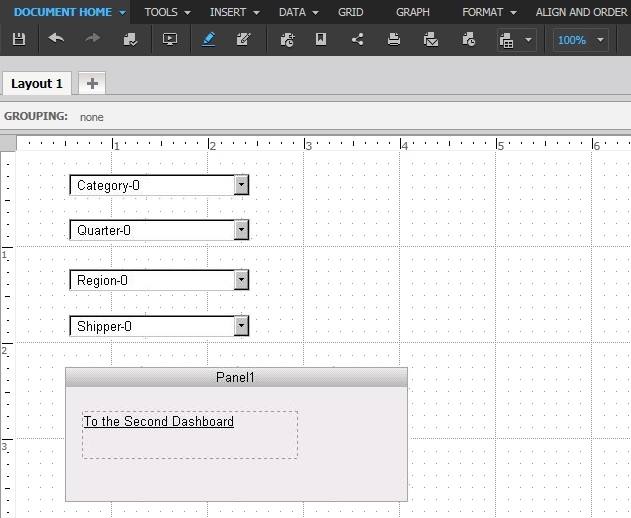
      
  • Make the Panel created above as the target of the three selectors created in Step 4.
  • Dashboard A should look similar to the one in the image below:
     
ka0PW0000001JjEYAU_0EM440000002Hda.jpeg
  • The above URL in Dashboard A will pass the selector values to Document B.


Learning Resources

Interested in learning more about Documents or Dossier authoring? Visit the Learning Center on Community!
Or go to our Documentation pages for more product information. 


Comment

0 comments

Details

Knowledge Article

Published:

March 30, 2017

Last Updated:

March 21, 2024