SYMPTOM:
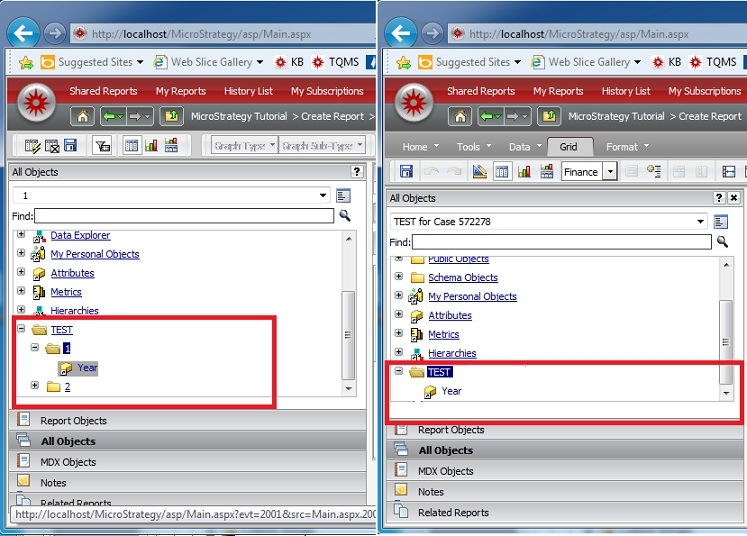
A user sets Report Web Browsing options for a report within Strategy Web 9.4.1. When in tree view mode, the subfolders within the designated folder will disappear, however the objects inside the folders will display as if they belonged to the parent folder, like shown below.
Notice how the shortcut to the Year attribute is inside the folder "1" on the left, while the same folder doesn't display on the right.
STEPS TO REPRODUCE:
CAUSE:
This is a known issue in Strategy Web 9.4.1.
ACTION:
This issue has been addressed in Strategy Web 9.4.1 Hotfix 2. Upgrade to that version to take advantage of this fix.
WORKAROUND:
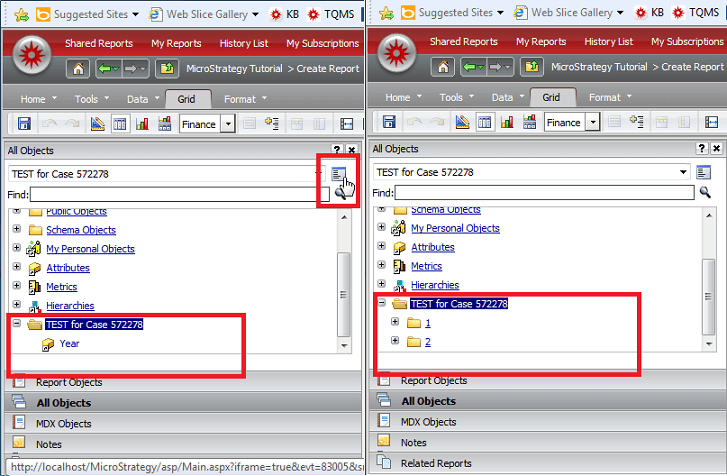
Toggling between list and tree view will display the correct folder structure again.
f
