SYMPTOM:
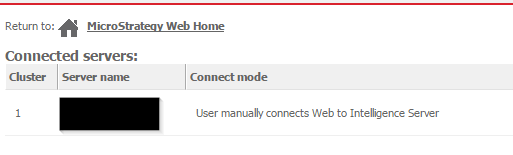
When connecting to Strategy Web 9.x, 10.x for the first time, an error appears stating there are no projects connected, like shown below.

There are no projects connected to this web server. To configure projects, go to the Web Administrator
CAUSE:
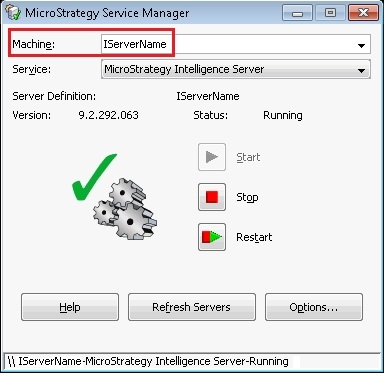
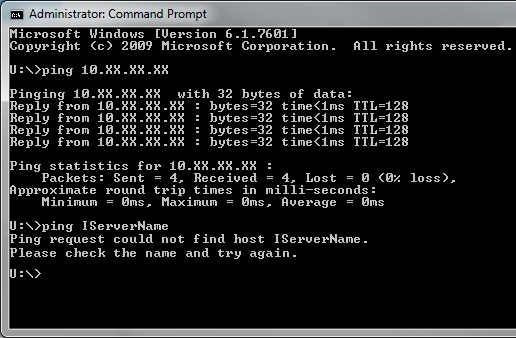
One of the possible causes is a network issue in which the Web server machine is able to ping the Strategy Intelligence Server machine's IP address, but not its server name. Under some scenarios, the Web server machine may even be able to ping the Strategy Intelligence Server machine's fully qualified domain name (FQDN), yet just the machine's name is unreachable.
Being able to ping the IP address or even the FQDN of the Strategy Intelligence Server machine will allow Strategy Web to connect to it, however it will not be enough to retrieve the list of projects.
When the Strategy Web server makes the request for the list of projects it does so with a Strategy Intelligence Server name. When the Strategy Intelligence Server replies with the list of projects it will include the Strategy Intelligence Server name. If the two server names are different between each other, the Strategy Web server will not trust the response and the list of projects is dropped causing the issue. This can be verified through the Kernel XML trace.
A sample trace will show the parameter:
<server n="server name" ps="0"/>
C:\Windows\System32\drivers\etc
web server's IP address                web server name         web servers fqdn
Intelligence Server's IP address    IServer name               IServer fqdn
10.xx.xx.yy        myWeb           myWeb.domainWeb.com
10.xx.xx.cc        myIServer       myIServer.domainIServer.com
If the list of projects shows up now, the problem has been proved to be caused by the network problem where only the IP and FQDN is reachable, but not the machine name. Now the requests for the server name will be associated with its FQDN and IP address.
Note: If the above fails, collect the Kernel XML trace, find the server name node and use this server name in the host file.
ACTION:
Undo the changes made to both of the host files and contact your network team for further help in mapping the machine's names to their respective IP addresses.
WORKAROUND:
It is a valid workaround to keep the changes in the host files until the network team provides a more permanent solution.
WARNING: IP addresses and server names can be change by the network team without prior notice. Having these values hard-coded in the host file can cause network problems if those values are later changed by the network team. Any edit of the host files is done at the user's own risk. Since these are user-initiated changes, they are not covered by any Strategy warranty. The user should backup the host file prior to alterations.
