EducationSoftwareStrategy.com
StrategyCommunity

Knowledge Base

Product

Community

Knowledge Base

TopicsBrowse ArticlesDeveloper Zone

Product

Download SoftwareProduct DocumentationSecurity Hub

Education

Tutorial VideosSolution GalleryEducation courses

Community

GuidelinesGrandmastersEvents
x_social-icon_white.svglinkedin_social-icon_white.svg
Strategy logoCommunity

© Strategy Inc. All Rights Reserved.

LegalTerms of UsePrivacy Policy
  1. Home
  2. Topics

KB40662: "XXX IS AN INVALID NUMERIC LITERAL. For more information, please consult DB2 document for error code SQL0103" error message appears in the SQL when running a report against DB2 Warehouse.


Community Admin

• Strategy


SYMPTOM:
In DB2 changing the VLDB setting "Intermediate Table Type", located under the 'Tables' heading, to True Temporary Table may result in intermittent names that begin with a number. This may result with the following error:


The following error occurs in pass 0: Execute Query failed. Error type: ODBC error. ODBC operation attempted: SQLExecDirect. .0XVDIC00 IS AN INVALID NUMERIC LITERAL. For more information, please consult DB2 document for error code SQL0103.

CAUSE:
The cause of this is the VLDB property change combined with the lack of a table prefix. There is a chance that the creation of the table will randomly start with a number instead of a letter causing an error. In order to make the change, but avoid a table number, a prefix must be specified in the Database Instance.
ACTION:
In order to avoid creating a table that begins with a number, please try the following steps:
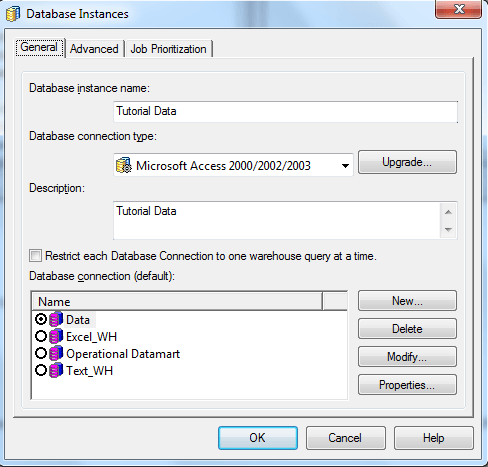
1. Open the Database Instance found in Administration>Configuration Manager>Database Instances and click on Modify

ka04W000000Oha1QAC_0EM440000002JFS.png

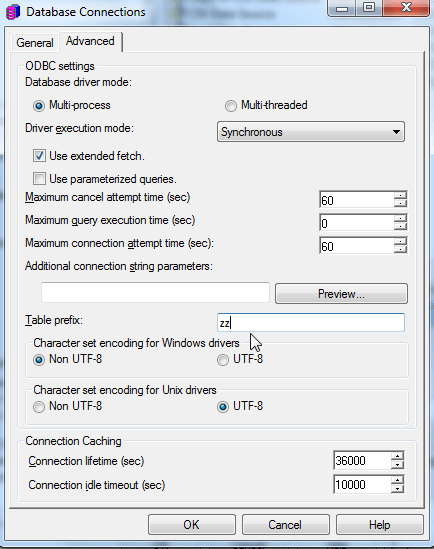
2. In the Database Connection, click on Advanced and on the Table prefix add ZZ. All new tables created will start with ZZ, and the reports shall run correctly.
ka04W000000Oha1QAC_0EM440000002JFQ.png

Comment

0 comments

Details

Knowledge Article

Published:

May 12, 2017

Last Updated:

May 12, 2017