EducationSoftwareStrategy.com
StrategyCommunity

Knowledge Base

Product

Community

Knowledge Base

TopicsBrowse ArticlesDeveloper Zone

Product

Download SoftwareProduct DocumentationSecurity Hub

Education

Tutorial VideosSolution GalleryEducation courses

Community

GuidelinesGrandmastersEvents
x_social-icon_white.svglinkedin_social-icon_white.svg
Strategy logoCommunity

© Strategy Inc. All Rights Reserved.

LegalTerms of UsePrivacy Policy
  1. Home
  2. Topics

KB406738: Users are unable to access Microstrategy Web with the error ‘HTTP Error 403 – Forbidden’


Community Admin

• Strategy


Article outlines why the error HTTP Error 403 – Forbidden’ maybe returned when attempting to access MicroStrategy Web.

SYMPTOM:
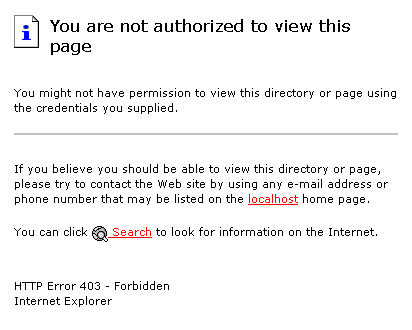
When users try to access Strategy Web using the URL http://localhost/MicroStrategy/aspx/, the following error message appears:
ka04W000000OfYnQAK_0EM4400000028oG.jpeg

 
You are not authorized to view this page…HTTP Error 403 - Forbidden
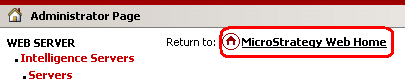
However, users can access Strategy Web 8.1.x through the Web Administrator Page link, as shown below:
 

ka04W000000OfYnQAK_0EM4400000028oK.jpeg

 
CAUSE:
The web server is not completely configured.
 
ACTION:
Perform the following steps in order to resolve the issue:
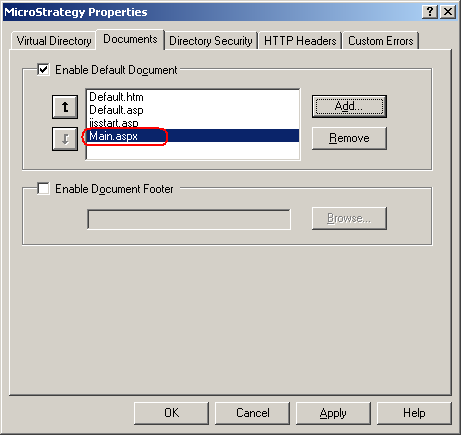
  • Right-click on the Strategy virtual directory in IIS and go to Properties > Documents.
  • Add 'Main.aspx' as shown below:
ka04W000000OfYnQAK_0EM4400000028oE.jpeg
  • Restart IIS. Now access Strategy Web using the default url, and users should be able to access it without any errors.

KB406738


Comment

0 comments

Details

Knowledge Article

Published:

June 8, 2017

Last Updated:

December 31, 2018