EducationSoftwareStrategy.com
StrategyCommunity

Knowledge Base

Product

Community

Knowledge Base

TopicsBrowse ArticlesDeveloper Zone

Product

Download SoftwareProduct DocumentationSecurity Hub

Education

Tutorial VideosSolution GalleryEducation courses

Community

GuidelinesGrandmastersEvents
x_social-icon_white.svglinkedin_social-icon_white.svg
Strategy logoCommunity

© Strategy Inc. All Rights Reserved.

LegalTerms of UsePrivacy Policy
  1. Home
  2. Topics

KB40686: How to allow users to select a currency at run-time in reports or documents executed in Developer or Web 9.x and higher?


Stefan Zepeda

Salesforce Solutions Architect • Strategy


This technical note describes one way to allow users to select a currency at run-time in reports or documents executed in Developer or Web 9.x and later

How to allow users to select a currency at run-time in reports or documents executed in Developer or Web 9.x and later?
 
It would be possible to add a column to the relevant data warehouse tables for each currency, using this as the basis for an attribute element prompt, which would allow users to select the desired currency when executing reports or documents.
 
Should users wish to avoid making manipulations to the data warehouse, the following options are available within Strategy 9.x and later:

  • Create a compound metric for each currency, dividing the figure in the original currency by the exchange rate.  It would be possible to introduce an object prompt to permit users to select the relevant metric at run-time.  This can be achieved as follows:

    - Create a metric for each currency, based on a division of the original metric by the exchange rate:

ka02R000000kY2ZQAU_0EM440000002DBZ.jpeg
  • - Define an object prompt, to allow users to specify whether to display the original 'Revenue' metric in the report, or the new 'Other currency metric':

ka02R000000kY2ZQAU_0EM440000002DBi.jpeg
  •  

    - Add this object prompt to the report template:

ka02R000000kY2ZQAU_0EM440000002DBl.jpeg
  • - At run-time, users will have the option to select the metric relating to the appropriate currency:

ka02R000000kY2ZQAU_0EM440000002DBa.jpeg
  • - If the 'Other currency metric' is selected upon report execution, the data will be converted according to the exchange rate set within the metric definition:

ka02R000000kY2ZQAU_0EM440000002DBU.jpeg
  • Incorporate a value prompt within the definition of the metric, so that users can enter the exchange rate when executing reports.  This can be implemented according to the following steps:

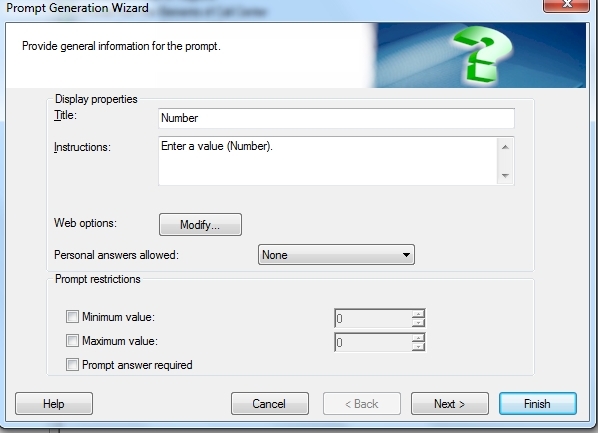
    - Create a value prompt, as illustrated below:

ka02R000000kY2ZQAU_0EM440000002DBk.jpeg
  • - Include this prompt within the definition of a new metric:

ka02R000000kY2ZQAU_0EM440000002DBc.jpeg
  • - At run-time, users will be prompted to specify a factor by which to multiply the value of the metric in the original 'Revenue' metric:

ka02R000000kY2ZQAU_0EM440000002DBn.jpeg
  • - The resulting report will display the value for the metric according to the exchange rate specified by the user:

    -
ka02R000000kY2ZQAU_0EM440000002DBX.jpeg


Comment

0 comments

Details

Knowledge Article

Published:

June 12, 2017

Last Updated:

June 12, 2017