EducationSoftwareStrategy.com
StrategyCommunity

Knowledge Base

Product

Community

Knowledge Base

TopicsBrowse ArticlesDeveloper Zone

Product

Download SoftwareProduct DocumentationSecurity Hub

Education

Tutorial VideosSolution GalleryEducation courses

Community

GuidelinesGrandmastersEvents
x_social-icon_white.svglinkedin_social-icon_white.svg
Strategy logoCommunity

© Strategy Inc. All Rights Reserved.

LegalTerms of UsePrivacy Policy
  1. Home
  2. Topics

How to increase the Java Heap size in Tomcat Application Server


Community Admin

• Strategy


Description

To increase the Java heap size in Tomcat, follow the instructions below:


  1. Go to <Tomcat Home Directory>/bin and create a file named setenv.sh for Linux systems or setenv.bat for Windows.
  2. Inside the setenv file, use the following format to set the heap size using the following parameters:
     

Linux:


  export CATALINA_OPTS="-Xms4096M -Xmx4096M"

         
            Windows:

  set CATALINA_OPTS=-Xms4096M -Xmx4096M

       3. Make sure both the values match for minimum and maximum.
       4. Save the file and restart Tomcat.
 

In recent versions on Windows, you can instead set this in the Tomcat interface: 

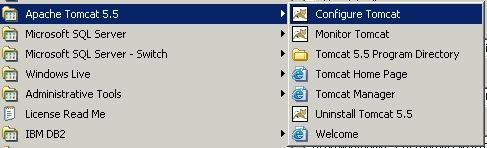
  1. Go to Start > All Programs > Apache Tomcat x.x > Configure Tomcat.


ka0PW0000000cuvYAA_0EM44000000292N.jpeg

Alternatively, please run:
c:\Program Files (x86)\Common Files\Strategy\Tomcat\apache-tomcat-9.0.xx\bin\tomcat9w.exe
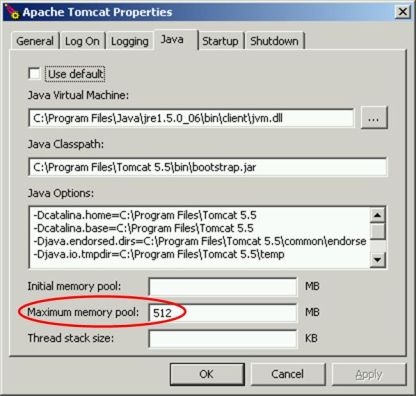
 

  1. Go to the Java tab and specify a maximum memory pool:


ka0PW0000000cuvYAA_0EM44000000292L.jpeg


  1. Save the changes and startup or restart Tomcat.

 
Remember that the memory used will decrease available RAM on the machine. This may lead to performance issues if set too high, so set the value with care. For additional information on optimizing Tomcat memory usage, please refer to:
https://cwiki.apache.org/confluence/display/TOMCAT/Memory .


Comment

0 comments

Details

Knowledge Article

Published:

March 30, 2017

Last Updated:

February 13, 2024