Microsoft SQL Server 2008 introduced several new data types. Among those were TIME, DATE, and DATETIME2. Strategy Intelligence Server supports these new data types. Users need to set up the environment so that these data types can be properly supported.
Strategy 9.4.1 - 10.x
Windows Intelligence Server: The default ODBC Driver that comes pre-installed on Windows OS is known as the “SQL Server” ODBC Driver. This driver does not support the new data types and therefore cannot be used in cases where TIME, DATE, and DATETIME2 data types need to be supported. Instead, users must install and configure the “SQL Server Native Client” ODBC Driver. The “SQL Server Native Client” ODBC Driver can be found on the SQL Server installation media or can be downloaded from Microsoft. When configuring the Strategy Database Instance users must also make sure to pick the correct database connection type: “Microsoft SQL Server 2008 with Native Client” if using SQL Server 2008 or “Microsoft SQL Server 2012” if using SQL Server 2012.
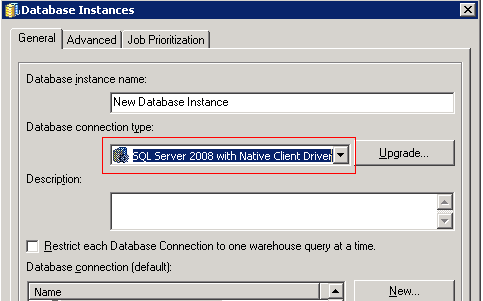
Linux/UNIX Intelligence Server: On the Linux/UNIX OS the certified ODBC Driver is the Strategy ODBC Driver for SQL Server Wire Protocol. This is a newer driver that is based off of the “SQL Server Native Client” driver found on Windows and therefore does support the new data types. Users must configure the Strategy Database Instance to use the “Microsoft SQL Server 2008 with Native Client” object when connecting to SQL Server 2008 or “Microsoft SQL Server 2012” when connecting to SQL Server 2012. Taking these steps will allow for support of the TIME, DATE, and DATETIME2 data types.
The following chart illustrates how Strategy supports the new SQL Server 2008 data types of TIME, DATE, and DATETIME2 with Strategy 9.3.0 - 9.3.1 and SQL Server 2008/2012.
2008 (all service packs) | Driver: Microsoft “SQL Server Native Client” ODBC Driver DB object: “Microsoft SQL Server 2008 with Native Client” | Driver: Strategy ODBC Driver for SQL Server Wire Protocol DB object: “Microsoft SQL Server 2008 with Native Client” |
2012 | Driver: Microsoft “SQL Server Native Client” ODBC Driver DB object: “Microsoft SQL Server 2012” | Driver: Strategy ODBC Driver for SQL Server Wire Protocol DB object: “Microsoft SQL Server 2012” |
Third Party Software Installation WARNING:
The third-party product(s) discussed in this technical note is manufactured by vendors independent of Strategy. Strategy makes no warranty, express, implied or otherwise, regarding this product, including its performance or reliability.
