EducationSoftwareStrategy.com
StrategyCommunity

Knowledge Base

Product

Community

Knowledge Base

TopicsBrowse ArticlesDeveloper Zone

Product

Download SoftwareProduct DocumentationSecurity Hub

Education

Tutorial VideosSolution GalleryEducation courses

Community

GuidelinesGrandmastersEvents
x_social-icon_white.svglinkedin_social-icon_white.svg
Strategy logoCommunity

© Strategy Inc. All Rights Reserved.

LegalTerms of UsePrivacy Policy
  1. Home
  2. Topics

KB40752: Changes in the view filter condition of a prompted element in a cube report are not applied in MicroStrategy Developer 9.4.1 and 10.x.


Stefan Zepeda

Salesforce Solutions Architect • Strategy


In a prompted cube report in MicroStrategy Developer 9.4.1 and 10.x, changes in the view filter condition of a prompted element are not applied.

SYMPTOM:
In a prompted cube report in Strategy Developer 9.4.1 and 10.x, changes in the view filter condition of a prompted element are not applied.
 
STEPS TO REPRODUCE:
1) In the Tutorial project within Strategy Developer, create a simple report from an intelligent cube with Category, Month and Revenue on the template.
2) Add a view filter condition: Elements of Month prompted expression.
3) Run the report.
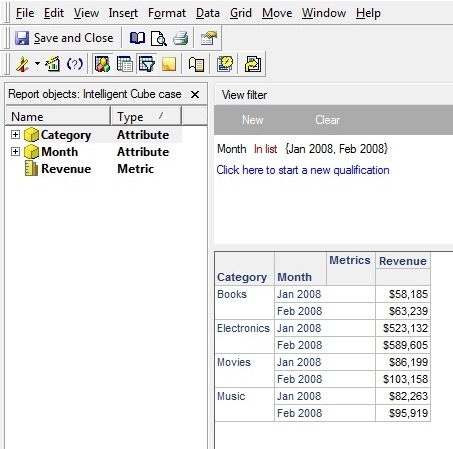
3) When prompted, select for example 2 months and run report.
 

ka02R000000kWVyQAM_0EM440000002DAx.jpeg

 
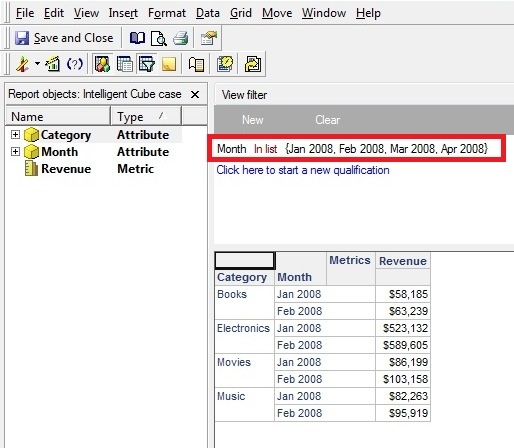
4) Now modify view filter condition and make a new selection of months, in this example add the next two months.
 

ka02R000000kWVyQAM_0EM440000002DAv.jpeg

 
6) The change is not taken into account - the view filter shows new selection, but the results in the grid have not changed.
 
CAUSE:
This is a known issue with Strategy Desktop 9.4.1 and 10.x.
 
ACTION:
Currently this issue is still being reviewed for feasibility by our Technology team and it is not scoped for any upcoming scheduled Strategy release.


Comment

0 comments

Details

Knowledge Article

Published:

June 30, 2017

Last Updated:

June 30, 2017