EducationSoftwareStrategy.com
StrategyCommunity

Knowledge Base

Product

Community

Knowledge Base

TopicsBrowse ArticlesDeveloper Zone

Product

Download SoftwareProduct DocumentationSecurity Hub

Education

Tutorial VideosSolution GalleryEducation courses

Community

GuidelinesGrandmastersEvents
x_social-icon_white.svglinkedin_social-icon_white.svg
Strategy logoCommunity

© Strategy Inc. All Rights Reserved.

LegalTerms of UsePrivacy Policy
  1. Home
  2. Topics

With Web 9.2.x, users do not receive the "History List is full" message when they subscribe reports or documents to the History List and the count exceeds the "Maximum number of messages per user" set at the project level


Luis Garces Martinez

Product Owner, Principal • MicroStrategy


Description

Starting in Strategy Web 9.2.x, users do not get the 'User History List is full' error message, when they subscribe reports/documents to History List and their count exceeds the 'Maximum number of messages per user' set at the project level. If the users try to 'Add to History List' directly, they do encounter the error and are not able to add the report to history list, which is expected behavior if the 'Maximum number of messages per user setting is exceeded.
Steps to reproduce

  1. Log into Strategy Tutorial in Developer.
  2. Launch the Project Configuration.
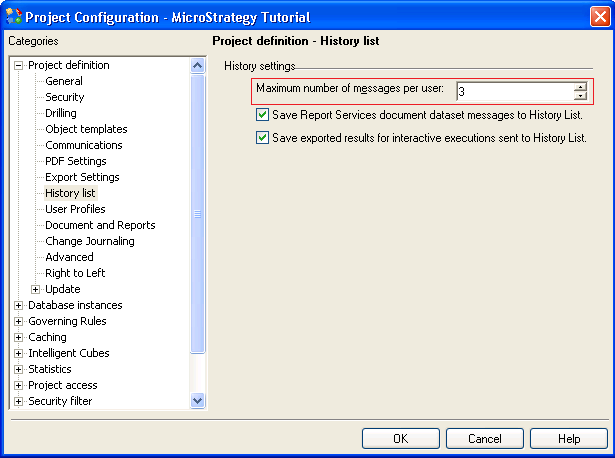
  3. Click on History List > Set the Maximum number of messages per user to 3.


ka02R000000g2DGQAY_0EM440000002DAq.png


  1. Next, log into Strategy Web.
  2. Execute any report of your choosing.
  3. Click on Home > Add to History List.


ka02R000000g2DGQAY_0EM440000002DAu.png


  • Repeat the above steps with an additional 2 more reports.
  • Execute a 4th report. 
  • Choose Subscribe to > History List > Run subscription immediately.

ka02R000000g2DGQAY_0EM440000002DB7.png
  • The user will receive the message: Subscription created successfully.
  • User will note receive the error message: User History List is full. 
  • When checking the History List, the subscribed message will not show up.  
ka02R000000g2DGQAY_0EM440000002DAt.png

 
Note: If the user adds the 4th report to the History List directly, they will encounter the error. The user will not be able to add the report to History List, which is expected behavior if the Maximum number of messages per user setting is exceeded.

ka02R000000g2DGQAY_0EM440000002DAw.png


Why is this happening?

This is a known issue found in Strategy Web 9.2.x. when sending subscriptions to History List.

Solution

Our engineers are working to enhance the overall Strategy experience.
Strategy will continue to investigate and post updates as soon as they are available. 

Learning Resources

Interested in learning more about Reports or Documents? Visit the Learning Center on Community!
Or feel free to go to Documentation to get product information.


Comment

0 comments

Details

Knowledge Article

Published:

April 3, 2017

Last Updated:

August 30, 2019