EducationSoftwareStrategy.com
StrategyCommunity

Knowledge Base

Product

Community

Knowledge Base

TopicsBrowse ArticlesDeveloper Zone

Product

Download SoftwareProduct DocumentationSecurity Hub

Education

Tutorial VideosSolution GalleryEducation courses

Community

GuidelinesGrandmastersEvents
x_social-icon_white.svglinkedin_social-icon_white.svg
Strategy logoCommunity

© Strategy Inc. All Rights Reserved.

LegalTerms of UsePrivacy Policy
  1. Home
  2. Topics

KB40772: How to create a metric that uses different multiplier for different elements of consolidations or custom groups in MicroStrategy Developer


Community Admin

• Strategy


How to create a metric that uses different multiplier for different elements of consolidations or custom groups.

In some business scenarios, it is required to create a metric that can be recalculated according to different consolidations or custom groups.
In this example, all of months are divided into four seasons in Strategy Tutorial project.

  • Winter: December, January, February
  • Spring: March, April, May
  • Summer: June, July, August
  • Autumn: September, October, November

And target revenue uses different multiplier for different element in a consolidation or custom group as below:

  • Target Revenue (Winter) = revenue * 4
  • Target Revenue (Spring) = revenue * 3
  • Target Revenue (Summer) = revenue * 2
  • Target Revenue (Autumn) = revenue

For the steps below to achieve this:

ka04W000000uGBqQAM_0EM440000002D9z.jpeg


ka04W000000uGBqQAM_0EM440000002DA3.jpeg

 
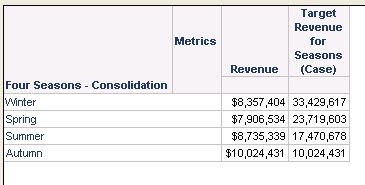
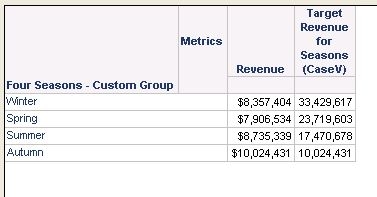
NOTE:The metrics using either Case() function or CaseV() function return the same result as expected.
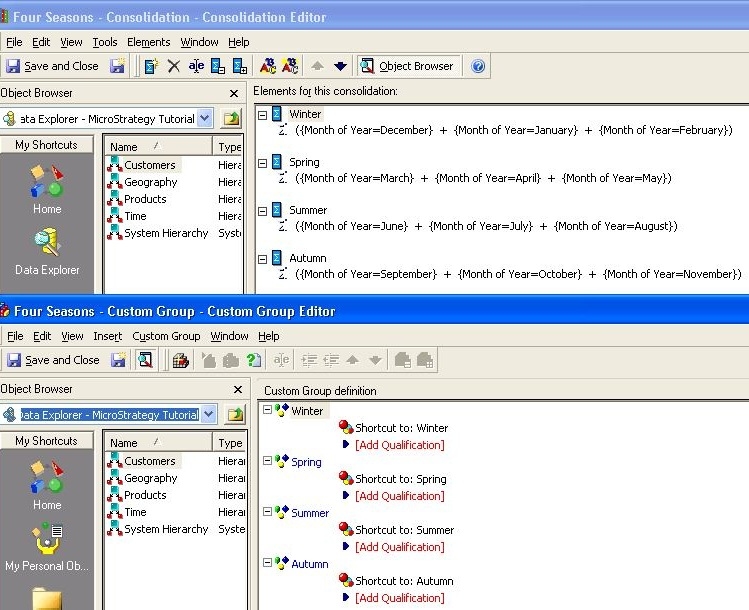
 

  • Definitions of the Consolidation and the Custom Group is shown below:
ka04W000000uGBqQAM_0EM440000002DAP.jpeg
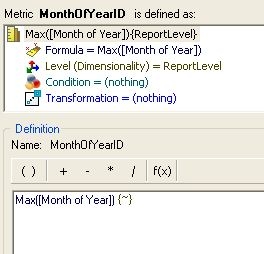
  • Max() function is used to transfer an attribute (in this example, Attribute is used) into a metric, since Case() function and CaseV() function only accept metrics.
     
    The definition of MonthOfYearID metric, which returns ID of Month of Year, is shown below:
ka04W000000uGBqQAM_0EM440000002DA1.jpeg
  • Sample Code/Error

    Max() {~}


  • Use either Case() or CaseV() to create the target metric.
     
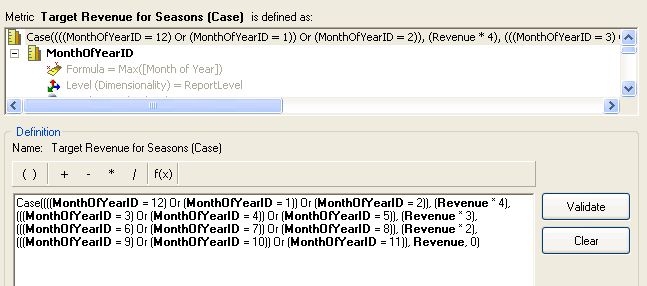
    If Case() Function is used, the definition is shown below:
ka04W000000uGBqQAM_0EM440000002DA2.jpeg
  •  

    Sample Code/Error

    Case((((MonthOfYearID = 12) Or (MonthOfYearID = 1)) Or (MonthOfYearID = 2)), (Revenue * 4), (((MonthOfYearID = 3) Or (MonthOfYearID = 4)) Or (MonthOfYearID = 5)), (Revenue * 3), (((MonthOfYearID = 6) Or (MonthOfYearID = 7)) Or (MonthOfYearID = 8)), (Revenue * 2), (((MonthOfYearID = 9) Or (MonthOfYearID = 10)) Or (MonthOfYearID = 11)), Revenue, 0)


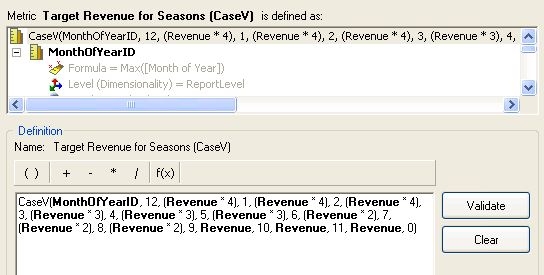
    If CaseV() Function is used, the definition is shown below:
ka04W000000uGBqQAM_0EM440000002DAO.jpeg
  •  
     
    For detailed grammar of Case() Function and CaseV() Function, refer to the technical note below:
    KB7127 - "Case and CaseV functions in the MicroStrategy 8 Analytical Engine". 


    Sample Code/Error

    CaseV(MonthOfYearID, 12, (Revenue * 4), 1, (Revenue * 4), 2, (Revenue * 4), 3, (Revenue * 3), 4, (Revenue * 3), 5, (Revenue * 3), 6, (Revenue * 2), 7, (Revenue * 2), 8, (Revenue * 2), 9, Revenue, 10, Revenue, 11, Revenue, 0)


    The report results are shown below:


KB40772


Comment

0 comments

Details

Knowledge Article

Published:

May 28, 2017

Last Updated:

December 31, 2018