EducationSoftwareStrategy.com
StrategyCommunity

Knowledge Base

Product

Community

Knowledge Base

TopicsBrowse ArticlesDeveloper Zone

Product

Download SoftwareProduct DocumentationSecurity Hub

Education

Tutorial VideosSolution GalleryEducation courses

Community

GuidelinesGrandmastersEvents
x_social-icon_white.svglinkedin_social-icon_white.svg
Strategy logoCommunity

© Strategy Inc. All Rights Reserved.

LegalTerms of UsePrivacy Policy
  1. Home
  2. Topics

KB40826: "System call error. shmget failed System Error (EINVAL): ---Invaild Argument" error occurs when trying to connect to the metadata via Configuration Wizard on Solaris in MicroStrategy 9.x.


Community Admin

• Strategy


This KB article describes an issue where the "System call error. shmget failed System Error (EINVAL): ---Invaild Argument" error occurs when trying to connect to the metadata via Configuration Wizard on Solaris in MicroStrategy 9.x.

SYMPTOM:
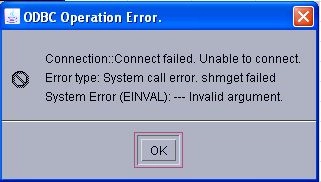
When trying to connect to the Strategy 9x metadata in Configuration Wizard on a Solaris Intelligence Server, the following error occurs:


ODBC Operation Error: Connection::Connect failed. Unable to connect. Error type: System call error. shmget failed System Error (EINVAL): ---Invaild Argument
 

ka04W000000OgzpQAC_0EM4400000029kR.jpeg

CAUSE:
The Solaris 'Shared Memory' setting has not been set to a value or has been set too low.  Contact the Server Administrator to increase the value.
Strategy Technical Support does not have any recommendations on the value for this setting. This setting controls how much memory the Intelligence Server can consume on the machine and this decision should be left to the Server Administrators. Contact Strategy Professional Services if tuning for this setting is necessary.
ACTION:
Set the Solaris Shared Memory setting to a specific/higher value.


Comment

0 comments

Details

Knowledge Article

Published:

June 6, 2017

Last Updated:

June 6, 2017