EducationSoftwareStrategy.com
StrategyCommunity

Knowledge Base

Product

Community

Knowledge Base

TopicsBrowse ArticlesDeveloper Zone

Product

Download SoftwareProduct DocumentationSecurity Hub

Education

Tutorial VideosSolution GalleryEducation courses

Community

GuidelinesGrandmastersEvents
x_social-icon_white.svglinkedin_social-icon_white.svg
Strategy logoCommunity

© Strategy Inc. All Rights Reserved.

LegalTerms of UsePrivacy Policy
  1. Home
  2. Topics

KB40857: How to export report to Microsoft Excel with unmerged headers in MicroStrategy Developer 9.x


Stefan Zepeda

Salesforce Solutions Architect • Strategy


How to export report to Microsoft Excel with unmerged headers in MicroStrategy Developer 9.x


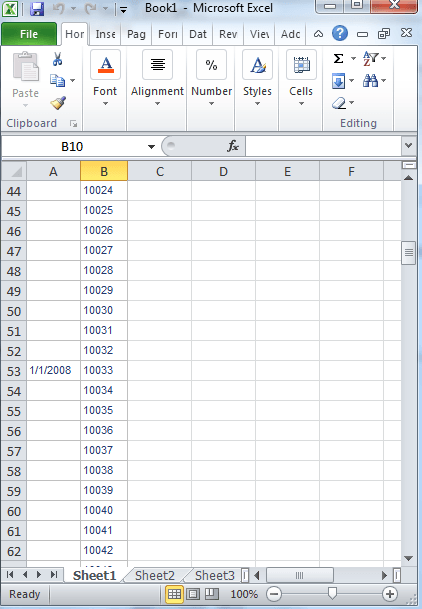
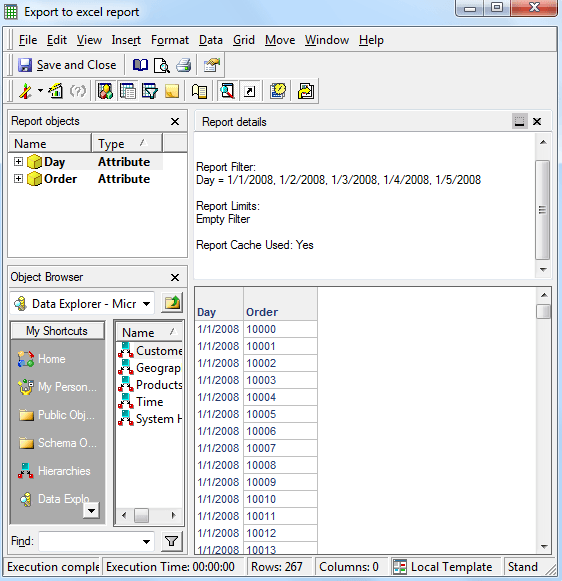
Even though the option to Merge Row Headers has been unselected in report, when exporting the report to Excel, the row headers are still merged.
 
Report with unmerged headers:
 

ka02R000000kWyAQAU_0EM440000002DAT.png

 
Export to Excel with merged headers:

ka02R000000kWyAQAU_0EM440000002DAZ.png

 
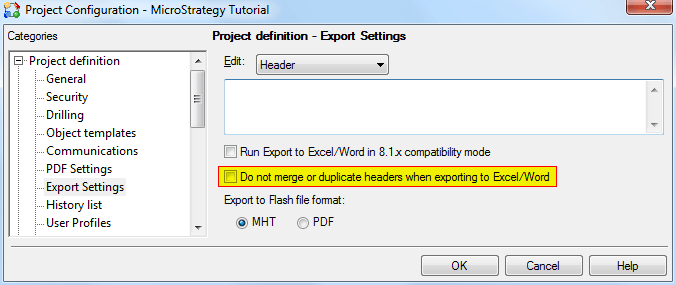
To change this option in Excel, unselect the option Do not merge or duplicate headers when exporting to Excel/Word in the Project Configuration and the headers will be unmerged in the Excel export.
 

ka02R000000kWyAQAU_0EM440000002DAX.png


Comment

0 comments

Details

Knowledge Article

Published:

April 13, 2017

Last Updated:

April 13, 2017