EducationSoftwareStrategy.com
StrategyCommunity

Knowledge Base

Product

Community

Knowledge Base

TopicsBrowse ArticlesDeveloper Zone

Product

Download SoftwareProduct DocumentationSecurity Hub

Education

Tutorial VideosSolution GalleryEducation courses

Community

GuidelinesGrandmastersEvents
x_social-icon_white.svglinkedin_social-icon_white.svg
Strategy logoCommunity

© Strategy Inc. All Rights Reserved.

LegalTerms of UsePrivacy Policy
  1. Home
  2. Topics

KB40895: "Dimensional Metric-Unsupported object in Metric" error message appears when running reports with element prompts in metric definitions in MicroStrategy Developer 9.x and 10.x


Stefan Zepeda

Salesforce Solutions Architect • Strategy


KB40895: "Dimensional Metric-Unsupported object in Metric" error message appears when running reports with element prompts in metric definitions in MicroStrategy Developer 9.x and 10.x

SYMPTOM:
 
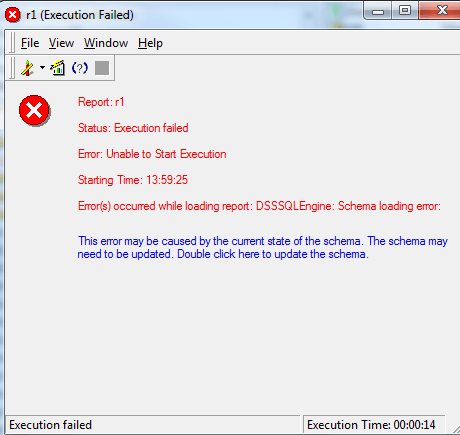
When running reports with element prompts in metric definitions in Strategy Developer 9.x and 10.x, following error message appears:
ka02R000000kbg2QAA_0EM440000002D7r.png

 
Error(s) occured while loading report: DSSSQLEngine: Schema loading error: Template(Local Template). -Template Unit Metrics-Template Metrics-Dimensional Metric (M1). -Dimensional Metric-Unsupported object in Metric.
 
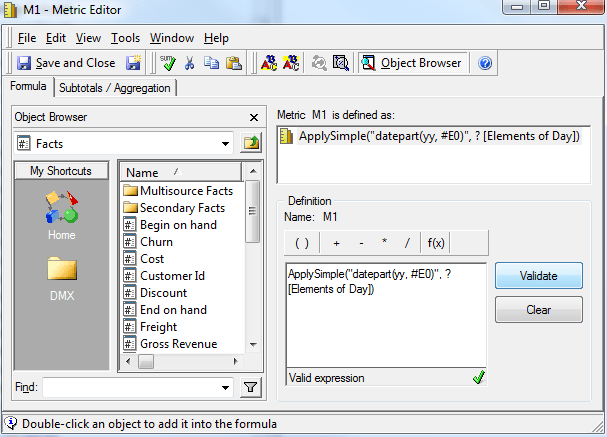
The metric definition contains an element prompt:
ka02R000000kbg2QAA_0EM440000002D7u.png


ApplySimple("datepart(yy, #E0)", ?[Elements of Day])
 
 
CAUSE:
This is because element prompt is not supported in metric definition in Strategy 9.x and 10.x. 
WORKAROUND: 
Value prompt can be used in metric definitions or users need to add element prompts in report level.   


Comment

0 comments

Details

Knowledge Article

Published:

June 12, 2017

Last Updated:

June 12, 2017