EducationSoftwareStrategy.com
StrategyCommunity

Knowledge Base

Product

Community

Knowledge Base

TopicsBrowse ArticlesDeveloper Zone

Product

Download SoftwareProduct DocumentationSecurity Hub

Education

Tutorial VideosSolution GalleryEducation courses

Community

GuidelinesGrandmastersEvents
x_social-icon_white.svglinkedin_social-icon_white.svg
Strategy logoCommunity

© Strategy Inc. All Rights Reserved.

LegalTerms of UsePrivacy Policy
  1. Home
  2. Topics

KB408992: How to Remove LDAP Attributes from the LDAP Connectivity Wizard or the Intelligence Server Configuration in MicroStrategy Desktop 9.x.


Community Admin

• Strategy


After adding LDAP attributes in either the LDAP Connectivity Wizard or the Intelligence Server Configuration, how can these attributes be removed?
 
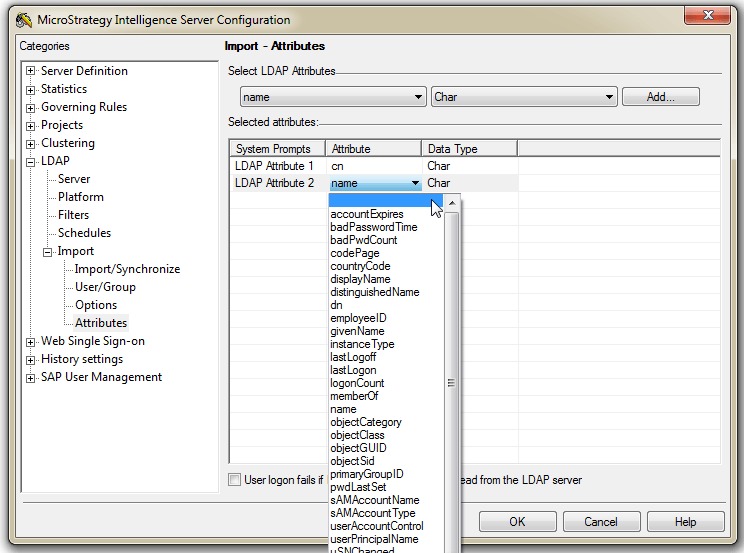
These attributes can be removed by changing the value in the "Attribute" column to blank, the first option in the drop-down.
 

ka04W000000OacaQAC_0EM4400000029mb.png


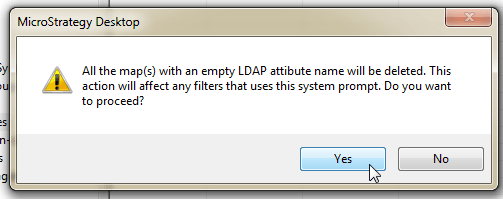
When finishing the LDAP Connectivity Wizard or clicking OK fo the Intelligence Server Configuration, a prompt will warn you that these attributes will be removed. To complete the process, click Yes.
 

ka04W000000OacaQAC_0EM4400000029mZ.png


  KB408992


Comment

0 comments

Details

Knowledge Article

Published:

June 9, 2017

Last Updated:

December 31, 2018