EducationSoftwareStrategy.com
StrategyCommunity

Knowledge Base

Product

Community

Knowledge Base

TopicsBrowse ArticlesDeveloper Zone

Product

Download SoftwareProduct DocumentationSecurity Hub

Education

Tutorial VideosSolution GalleryEducation courses

Community

GuidelinesGrandmastersEvents
x_social-icon_white.svglinkedin_social-icon_white.svg
Strategy logoCommunity

© Strategy Inc. All Rights Reserved.

LegalTerms of UsePrivacy Policy
  1. Home
  2. Topics

KB40903: What permissions and privileges are required for users to be able to import tables through Warehouse Catalog in MicroStrategy 9.x - 10.x


Stefan Zepeda

Salesforce Solutions Architect • Strategy


This technical note lists the permissions and privileges required for users to be able to import tables through Warehouse Catalog in MicroStrategy 9.x - 10.x

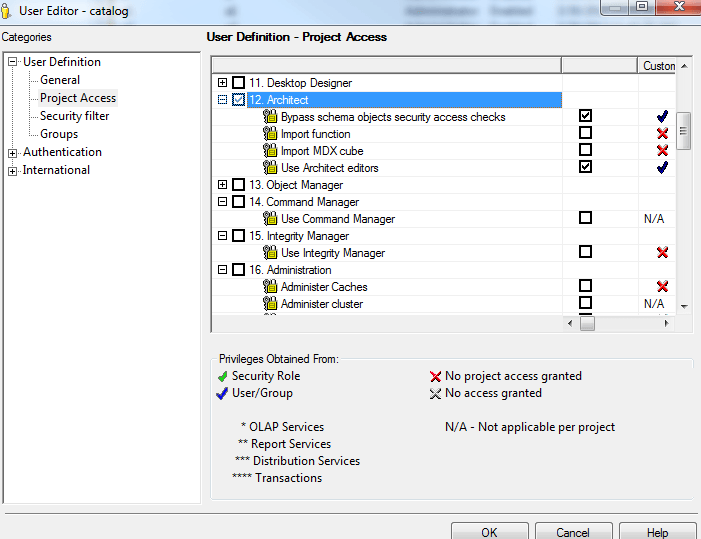
In some scenarios (perhaps due to security concerns), administrators may come to the requirement to create users that can only be able to import tables to Strategy. For such users, the minimum privileges are "Bypass schema objects security access checks" and "Use Architect Editor" under Architect:
ka02R000000kbuwQAA_0EM440000002D8f.png

 
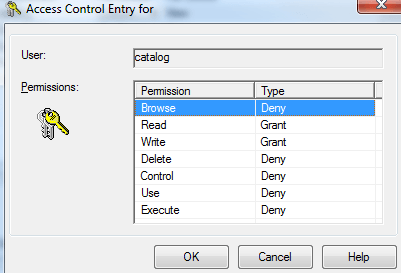
And the minimum permissions that users need to have are Read and Write permissions on folders Schema Objects > Tables and Partition Mappings:
ka02R000000kbuwQAA_0EM440000002D8d.png

 
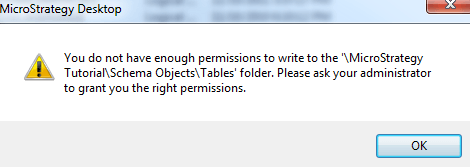
If above permissions is not setup correctly, then following error will appear upon opening up Warehouse Catalog:
ka02R000000kbuwQAA_0EM440000002D8j.png


You do not have enough permissions to write to the '\Strategy Tutorial\Schema Objects\Tables' folder. Please ask your administrator to grant you the right permissions.


Comment

0 comments

Details

Knowledge Article

Published:

June 6, 2017

Last Updated:

June 6, 2017