EducationSoftwareStrategy.com
StrategyCommunity

Knowledge Base

Product

Community

Knowledge Base

TopicsBrowse ArticlesDeveloper Zone

Product

Download SoftwareProduct DocumentationSecurity Hub

Education

Tutorial VideosSolution GalleryEducation courses

Community

GuidelinesGrandmastersEvents
x_social-icon_white.svglinkedin_social-icon_white.svg
Strategy logoCommunity

© Strategy Inc. All Rights Reserved.

LegalTerms of UsePrivacy Policy
  1. Home
  2. Topics

KB40915: Attribute Element Prompts are not supported using database pass-through functions within metric definitions in MicroStrategy Developer


Stefan Zepeda

Salesforce Solutions Architect • Strategy


SYMPTOM:
 
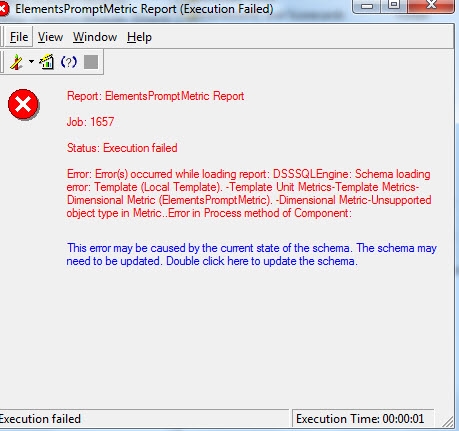
After executing a report with a metric defined using element prompts the following error will generate:


Error(s) occurred while loading report: DSSSQLEngine: Schema loading error: Template (Local Template). -Template Unit Metrics-Template Metrics-Dimensional Metric (<metric name>). -Dimensional Metric-Unsupported object type in Metric
 

ka02R000000kWz3QAE_0EM440000002CFP.jpeg

 
Steps to reproduce
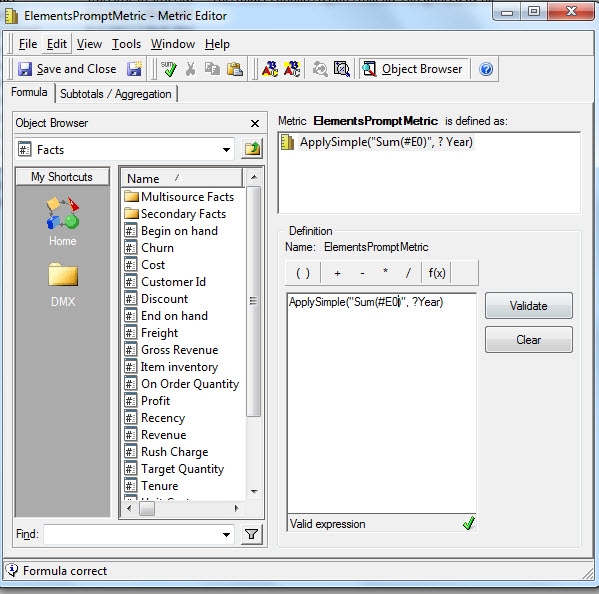
1.       Create an attribute element prompt (e.g. Year)
2.       Create a metric using either definition:  ApplySimple("Sum(#0)", ?Year) Or ApplySimple("Sum(#E0)", ?Year)
ka02R000000kWz3QAE_0EM440000002CFR.jpeg

3.       Add the metric to a simple report and execute.
CAUSE:
This is currently working as designed. Strategy does not currently support element prompts inside of metric definitions. There is an enhancement request to support this feature.
ACTION:
Contact Strategy Technical Support to find out the status of the enhancement.


Comment

0 comments

Details

Knowledge Article

Published:

April 12, 2017

Last Updated:

April 12, 2017