EducationSoftwareStrategy.com
StrategyCommunity

Knowledge Base

Product

Community

Knowledge Base

TopicsBrowse ArticlesDeveloper Zone

Product

Download SoftwareProduct DocumentationSecurity Hub

Education

Tutorial VideosSolution GalleryEducation courses

Community

GuidelinesGrandmastersEvents
x_social-icon_white.svglinkedin_social-icon_white.svg
Strategy logoCommunity

© Strategy Inc. All Rights Reserved.

LegalTerms of UsePrivacy Policy
  1. Home
  2. Topics

KB40926: "The certificate for this server is invalid." error appears when MicroStrategy Mobile configuration URL is applied on iPhone/iPad in MicroStrategy Mobile


Community Admin

• Strategy


This technical note article describes a problem encountered when configuring the MicroStrategy Mobile configURL on an iOS device with the MicroStrategy Mobile Certificate Server.

SYMPTOM:
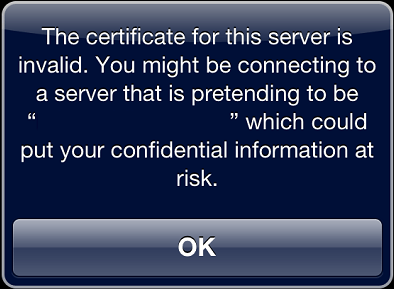
The following error appears when a Strategy Mobile ConfigURL is applied to an iPhone/iPad using the Strategy Certificate Server in Strategy Mobile 9.2.x:
 

ka04W00000148b5QAA_0EM440000002MVQ.png


"The certificate for this server is invalid. You might be connecting to a server that is pretending to be "xxx" which could put your confidential information at risk."

 
STEPS TO REPRODUCE:
Follow the steps below to reproduce the issue with Strategy Tutorial project:

  1. Follow steps in the technical note below to configure Strategy Certificate Server and create mobile configuration with Strategy Certificate Server URL: KB410043: How to configure the MicroStrategy Certificate Server for client certificate authentication for MicroStrategy Mobile 9.x
  2. Apply the configuration created above on the iPhone/iPad device, note that the issue occurs. 

CAUSE:
This error message means that the Root Certificate is not found on the Mobile client.
A root certificate is the top-most certificate of the tree, the private key of which is used to "sign" other certificates. User needs to download and install the root certificate on Mobile client before applying the Mobile configuration URL.
 
ACTION:
Install the Root Certificate in Mobile client. 


Comment

0 comments

Details

Knowledge Article

Published:

May 22, 2017

Last Updated:

May 22, 2017