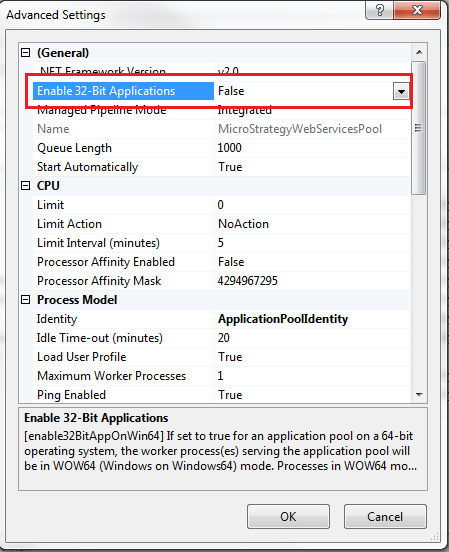
SYMPTOM:
When trying to access Strategy Web or Mobile 9.x pages on Microsoft IIS, the following error message is shown:
Server Error in '/Strategy' Application.
Could not load file or assembly 'MLJBRINF, Version=9.2.300.106, Culture=neutral, PublicKeyToken=null' or one of its dependencies. An attempt was made to load a program with an incorrect format.
Description: An unhandled exception occurred during the execution of the current web request. Please review the stack trace for more information about the error and where it originated in the code.
Exception Details: System.BadImageFormatException: Could not load file or assembly 'MLJBRINF, Version=9.2.300.106, Culture=neutral, PublicKeyToken=null' or one of its dependencies. An attempt was made to load a program with an incorrect format.
Source Error:
An unhandled exception was generated during the execution of the current web request. Information regarding the origin and location of the exception can be identified using the exception stack trace below.
System.Reflection.Assembly._nLoad(AssemblyName fileName, String codeBase, Evidence assemblySecurity, Assembly locationHint, StackCrawlMark& stackMark, Boolean throwOnFileNotFound, Boolean forIntrospection) +0

   System.Reflection.Assembly.nLoad(AssemblyName fileName, String codeBase, Evidence assemblySecurity, Assembly locationHint, StackCrawlMark& stackMark, Boolean throwOnFileNotFound, Boolean forIntrospection) +43

   System.Reflection.Assembly.InternalLoad(AssemblyName assemblyRef, Evidence assemblySecurity, StackCrawlMark& stackMark, Boolean forIntrospection) +127

   System.Reflection.Assembly.InternalLoad(String assemblyString, Evidence assemblySecurity, StackCrawlMark& stackMark, Boolean forIntrospection) +142

   System.Reflection.Assembly.Load(String assemblyString) +28

   System.Web.Configuration.CompilationSection.LoadAssemblyHelper(String assemblyName, Boolean starDirective) +46


   System.Web.Configuration.CompilationSection.LoadAssemblyHelper(String assemblyName, Boolean starDirective) +613

   System.Web.Configuration.CompilationSection.LoadAllAssembliesFromAppDomainBinDirectory() +203

   System.Web.Configuration.CompilationSection.LoadAssembly(AssemblyInfo ai) +105

   System.Web.Compilation.BuildManager.GetReferencedAssemblies(CompilationSection compConfig) +178

   System.Web.Compilation.BuildProvidersCompiler..ctor(VirtualPath configPath, Boolean supportLocalization, String outputAssemblyName) +54

   System.Web.Compilation.CodeDirectoryCompiler.GetCodeDirectoryAssembly(VirtualPath virtualDir, CodeDirectoryType dirType, String assemblyName, StringSet excludedSubdirectories, Boolean isDirectoryAllowed) +600

   System.Web.Compilation.BuildManager.CompileCodeDirectory(VirtualPath virtualDir, CodeDirectoryType dirType, String assemblyName, StringSet excludedSubdirectories) +128

   System.Web.Compilation.BuildManager.CompileCodeDirectories() +265

   System.Web.Compilation.BuildManager.EnsureTopLevelFilesCompiled() +320


   System.Web.Compilation.BuildManager.ReportTopLevelCompilationException() +58

   System.Web.Compilation.BuildManager.EnsureTopLevelFilesCompiled() +512

   System.Web.Hosting.HostingEnvironment.Initialize(ApplicationManager appManager, IApplicationHost appHost, IConfigMapPathFactory configMapPathFactory, HostingEnvironmentParameters hostingParameters) +729


   System.Web.HttpRuntime.FirstRequestInit(HttpContext context) +8910703

   System.Web.HttpRuntime.EnsureFirstRequestInit(HttpContext context) +85

   System.Web.HttpRuntime.ProcessRequestNotificationPrivate(IIS7WorkerRequest wr, HttpContext context) +333