EducationSoftwareStrategy.com
StrategyCommunity

Knowledge Base

Product

Community

Knowledge Base

TopicsBrowse ArticlesDeveloper Zone

Product

Download SoftwareProduct DocumentationSecurity Hub

Education

Tutorial VideosSolution GalleryEducation courses

Community

GuidelinesGrandmastersEvents
x_social-icon_white.svglinkedin_social-icon_white.svg
Strategy logoCommunity

© Strategy Inc. All Rights Reserved.

LegalTerms of UsePrivacy Policy
  1. Home
  2. Topics

KB409745: How to make the report service document fit to page or width in MicroStrategy Mobile 9.3.x and above on Android?


Community Admin

• Strategy


This document shows how to make the report service document fit to page or width in MicroStrategy Mobile 9.3.x and above on Android

In Strategy Mobile 9.3.x and above, there is a way to render the report service document fit to page or width to make the document uniform across different Android devices.
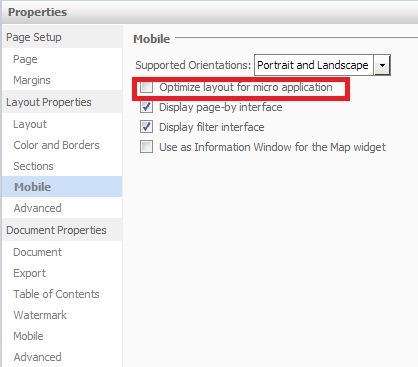
1. In Strategy Web, open the document in design mode,go to document properties > Mobile, check on "Optimize layout for micro applications".
ka04W000000ObMQQA0_0EM440000002ACK.jpeg

2. Run the document in interactive mode(or express, editable,flash mode). Zoom the layout to fit to page/width. Save the document.
3. Run the document in Strategy Mobile on Android. The document is fit to page/width.
 
This option only respects to Android. 
KB409745


Comment

0 comments

Details

Knowledge Article

Published:

March 30, 2017

Last Updated:

February 1, 2019