EducationSoftwareStrategy.com
StrategyCommunity

Knowledge Base

Product

Community

Knowledge Base

TopicsBrowse ArticlesDeveloper Zone

Product

Download SoftwareProduct DocumentationSecurity Hub

Education

Tutorial VideosSolution GalleryEducation courses

Community

GuidelinesGrandmastersEvents
x_social-icon_white.svglinkedin_social-icon_white.svg
Strategy logoCommunity

© Strategy Inc. All Rights Reserved.

LegalTerms of UsePrivacy Policy
  1. Home
  2. Topics

KB40992: How to get attribute prompt elements automatically updated after the data in warehouse has been modified without updating schema in MicroStrategy Web 9.x and 10.x


Stefan Zepeda

Salesforce Solutions Architect • Strategy


This article describes how to let prompt attribute's elements get automatically updated when user runs this prompt report in MicroStrategy Web

In some business scenarios, it is required to have the element list in a prompt being updated automatically without updating schema after the data in warehouse being modified.
The following steps describe how to let prompt attribute's elements get automatically updated when user runs this prompt report in Web. Tutorial project is used in this example.


ka02R000000kYCTQA2_0EM440000002D8r.png


  • Create an element prompt on Year attribute and use it as the filter of a report with Year attribute in row.
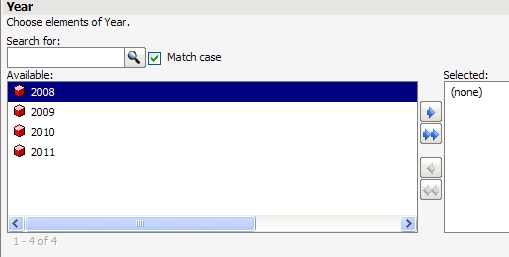
  • Run the report via Web. The prompt displays as the following screenshot.  
ka02R000000kYCTQA2_0EM440000002D8w.png
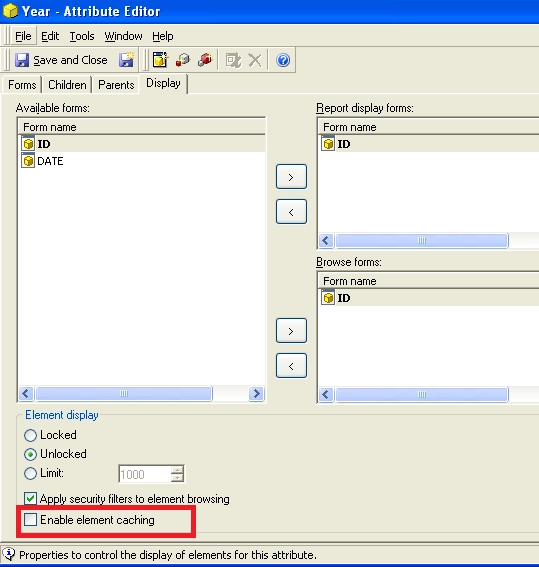
  • Open Attribute editor of Year, click tab 'Display' and uncheck 'Enable element caching', as shown below:         
ka02R000000kYCTQA2_0EM440000002D8p.png
  •  Insert a row '2012' in the lookup table of Year, as shown below.
ka02R000000kYCTQA2_0EM440000002D8m.png
  •  Run this report in Web again.


Note: The newly added element appears in the prompt while user does not perform updating schema.
 
Disable element caching can be applied at project level, Developer level and attribute level. User may apply it according to their development and performance needs.


Comment

0 comments

Details

Knowledge Article

Published:

June 9, 2017

Last Updated:

June 9, 2017