SYMPTOM:
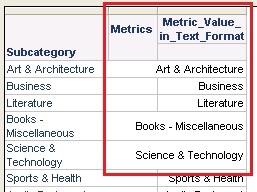
Word wrap does not work with metric value in text format in a report running in Strategy Developer 9.x.x-10.x, as shown below:
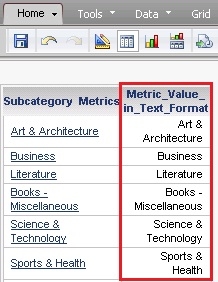
NOTE: The same report running in Strategy Web works fine with word wrap, as shown below:
STEPS TO REPRODUCE:
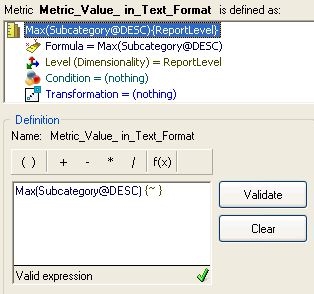
1 In Strategy Developer, create a metric with value in text format using the following definition:
Sample Code/Error
Max(Subcategory@DESC) {~}
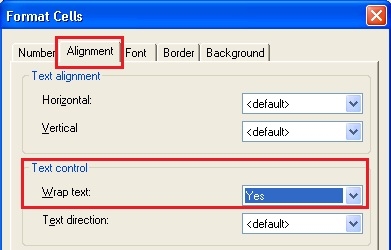
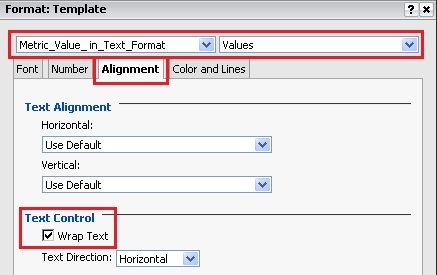
2. Go to Menu -> Tools -> Formatting -> Values, under Alignment tab, select 'Yes' for Wrap text, as shown below:
3. Save the metric and name it with 'Metric_Value_ in_Text_Format' as an example.
4. Create a report with attribute Subcategory and metric created in the previous step.
5. Right mouse click on the metric -> Formatting -> Metric Values, as shown below:
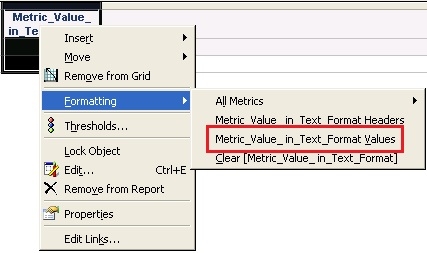
6. In Format Cells window under Alignment tab (same with screenshot in step 2), select from '<Default>' to 'Yes' for Wrap text. And click on OK to save the change.
7. Go to Menu -> Grid -> Options, under Columns and Rows tab, make sure Wordwrap is check, as shown below:
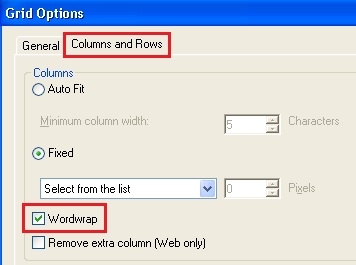
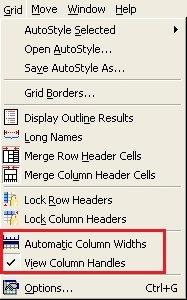
8. Save the report and name it with 'Metric Word Wrap' as an example. Run the report in Grid View. Go to Menu -> Grid, uncheck 'Automatic Column Widths', and make sure 'View Column Handles' is checked, as shown below:
9. Adjust the column width of the attribute and th metric to be about half of the original width. Re-execute the report and get the result as shown in SYMPTOM at the beginning of this technical note.
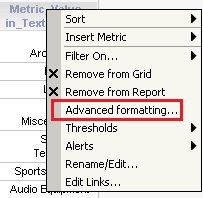
NOTE: With the following steps to display word wrap in Strategy Web.
CAUSE:
This is a known issue with Strategy Developer 9.4.x-10.x.
ACTION:
Strategy will continue to investigate and post updates as soon as they are available.
WORKAROUND:
In Developer, go to Menu -> Grid and check 'Automatic Column Widths'.
The Strategy Internal Reference Number for the issue discussed in this technical note is 653788.
