Every time an application crashes or shuts down unexpectedly within the iPhone, iPod Touch or iPad environments it generates a crash log which is saved in the device.
To retrieve the log file for examination and to troubleshoot a crash related to the Strategy iPhone/iPad Application follow these instructions:
1. Connect your iPhone, iPod touch or iPad to a machine with iTunes installed on it. Sync your device with iTunes as below:
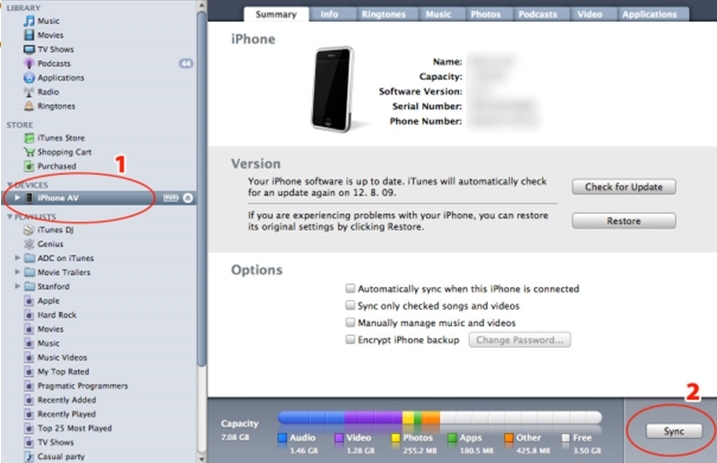
2. Retrieve the iPhone-AV.crash file from one of the following locations depending on your operating system:
Mac OS X
(user home directory)~/Library/Logs/CrashReporter/MobileDevice/<DEVICE_NAME>
C:\Users\<USERNAME>\AppData\Roaming\Apple computer\Logs\CrashReporter/MobileDevice/<DEVICE_NAME>
C:\Documents and Settings\<USERNAME>\Application Data\Apple computer\Logs\CrashReporter/<DEVICE_NAME>

Third Party Software Installation WARNING
The third-party product(s) discussed in this technical note is manufactured by vendors independent of Strategy. Strategy makes no warranty, express, implied or otherwise, regarding this product, including its performance or reliability.
KB410283
