EducationSoftwareStrategy.com
StrategyCommunity

Knowledge Base

Product

Community

Knowledge Base

TopicsBrowse ArticlesDeveloper Zone

Product

Download SoftwareProduct DocumentationSecurity Hub

Education

Tutorial VideosSolution GalleryEducation courses

Community

GuidelinesGrandmastersEvents
x_social-icon_white.svglinkedin_social-icon_white.svg
Strategy logoCommunity

© Strategy Inc. All Rights Reserved.

LegalTerms of UsePrivacy Policy
  1. Home
  2. Topics

KB41035: "Error when answering the prompt. Please review your answer(s)." error occurs when adding an attribute element list in the view filter of a FFSQL report in MicroStrategy Web 9.x


Community Admin

• Strategy


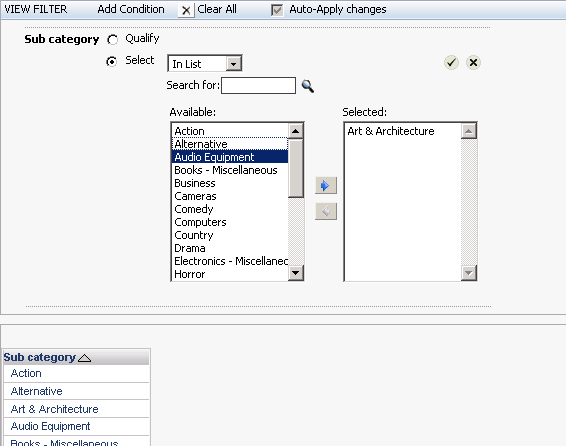
When users attempt to add an attribute element list condition in the view filter of a Freeform SQL report, the error "Your request could not be processed. Please try again..." appears in MicroStrategy Web 9.x when applying the change.

SYMPTOM:
 
When users attempt to add an attribute element list condition in the view filter of a Freeform SQL report, the following error appears in Strategy Web 9.x when applying the change:
 

ka04W000000ObNGQA0_0EM440000002713.png


ka04W000000ObNGQA0_0EM44000000271E.png


Your request could not be processed. Please try again. If the problem persists, contact the Administrator.

Error when answering the prompt. Please review your answer(s).
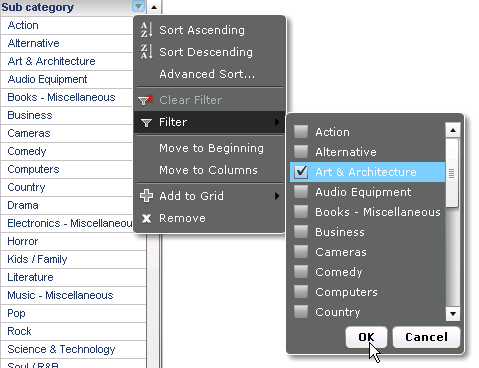
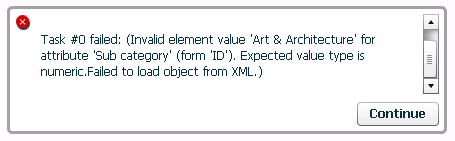
 
 
Similarly if the user tries to filter on the same dataset within a Document in Flash mode, the following error is encountered:
 

ka04W000000ObNGQA0_0EM44000000271C.png


ka04W000000ObNGQA0_0EM44000000271G.png


An unexpected error has occurred.

Task #0 failed: (Invalid element value 'Art & Architecture' for attribute 'Sub category' (form 'ID'). Expected value type is numeric.Failed to load object from XML.)
 
CAUSE:
 
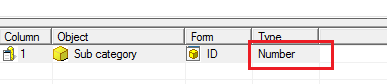
A possible cause of the issue is that the underlying FFSQL mapping is incorrect for the issue attribute. For instance, in the sample below, the 'Sub category' attribute ID should be of form 'TEXT' to be consistent with the underlying data from the warehouse, but instead, the ID is mapped to a number data type:
 

ka04W000000ObNGQA0_0EM440000002714.png

 
ACTION:
 
Change the mapped attribute form to the correct data type that is consistent with the underlying data. Refer to KB37494 for details on changing the data type.


Comment

0 comments

Details

Knowledge Article

Published:

March 31, 2017

Last Updated:

March 30, 2019
