EducationSoftwareStrategy.com
StrategyCommunity

Knowledge Base

Product

Community

Knowledge Base

TopicsBrowse ArticlesDeveloper Zone

Product

Download SoftwareProduct DocumentationSecurity Hub

Education

Tutorial VideosSolution GalleryEducation courses

Community

GuidelinesGrandmastersEvents
x_social-icon_white.svglinkedin_social-icon_white.svg
Strategy logoCommunity

© Strategy Inc. All Rights Reserved.

LegalTerms of UsePrivacy Policy
  1. Home
  2. Topics

KB41063: How to display animation images when running a Report Services document on iPad/iPhone in MicroStrategy Mobile 9.x


Community Admin

• Strategy


How to display animation images when running a Report Services document on iPad/iPhone in MicroStrategy Mobile 9.x

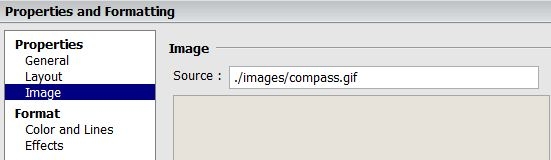
In Strategy Mobile 9.2.1m, run a Report Services document on iPad/iPhone, animation images in gif format cannot be displayed by inserting an image object as image source,  as shown below:
ka04W000000Oe0LQAS_0EM440000002AHB.jpeg

 
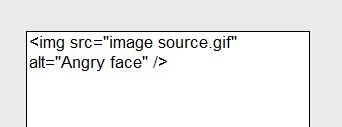
To display animation images in gif format, place the image in a HTML container. Add html codes in the Report Services document, as shown below:
 

ka04W000000Oe0LQAS_0EM440000002AHC.jpeg


Comment

0 comments

Details

Knowledge Article

Published:

June 14, 2017

Last Updated:

June 14, 2017